



The Complete Guide to Salesforce and Heroku Integration for Enterprises
Table of Contents
Salesforce is the source of truth for customer relationships. But the experiences customers interact with and want every day through mobile apps, high-volume services, real-time engagement layers, etc., often call for a level of scale and infrastructure that extends beyond the CRM platform.
Heroku brings that elasticity into the picture by enabling teams to build modern digital-first experiences while preserving Salesforce at the core of their data strategy.
The real question isn’t whether to integrate Salesforce and Heroku, but how. Different goals (real-time responsiveness, large-scale transactions, personalization or event processing) require different architectural patterns.
This blog gets you all the insights you need to address all your second thoughts on how to integrate Salesforce and Heroku.
Let’s dive in.
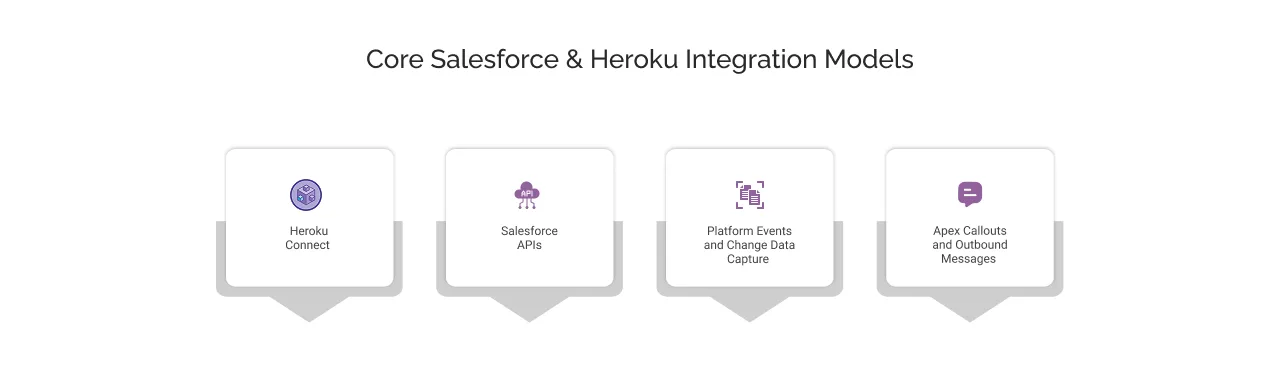
Core Salesforce & Heroku Integration Models
Salesforce and Heroku support multiple integration models that cater to different architectural needs. Each model offers clear advantages based on latency, control, data volume and developer effort.
Heroku Connect
Heroku Connect synchronises Salesforce data with a Heroku Postgres database, enabling bi-directional, near real-time sync between standard or custom objects and relational tables. Applications get native SQL access to Salesforce data with no API calls required. Sync operations do not count against Salesforce API Limits. Heroku Connect also supports Accelerated Polling with Change Data Capture (CDC) for faster record updates.
This model supports high-throughput use cases like mobile services, customer portals, and internal apps that depend on fresh, queryable data with minimal integration overhead.
Salesforce APIs
Heroku apps can interact directly with Salesforce using REST, SOAP, Bulk or Composite APIs. This model enables full control over data access and transformation, supports selective synchronisation, and powers custom logics. It is best for orchestration, workflow enrichment, and operations that extend beyond standard object sync.
API usage requires token management, error handling, and retry logic. All calls consume Salesforce API limits.
Platform Events and Change Data Capture
Event-driven models enable asynchronous, low-latency communication. Salesforce Platform Events and CDC publish structured event messages when records are created, updated or deleted. With the right Heroku Consulting partner on your side, you can consume these Heroku services and events using WebSocket-based clients such as CometD to trigger workflows or refresh local data in real time.
This integration pattern decouples systems and is well-suited for notifications, streaming updates, and event-based microservices.
Apex Callouts and Outbound Messages
Salesforce can initiate synchronous requests to Heroku endpoints using Apex HTTP callouts or outbound messages. This allows real-time execution of business logic on Heroku. Direct callouts tightly couple systems and consume Salesforce execution limits, so this model is best reserved for lightweight, high-priority use cases.
How to select the right model?
- Use Heroku Connect for high-volume object sync with minimal code.
- Choose API Integration for advanced control and data orchestration.
- Go for event-driven patterns for high-responsiveness and system decoupling.
- Apex callouts sounds good when immediate, synchronous execution is the priority.
Most enterprise architectures combine multiple models to optimize performance, reliability, and maintainability.
Heroku Connect Deep Dive: Architecture, Capabilities, and Operational Guidance
Heroku Connect is a fully managed, enterprise-grade sync engine that lets your application access and update Salesforce data as if it lived locally inside a Heroku Postgres database.
Heroku Connect removes the integration challenges and makes Salesforce data instantly useful in your app stack, no matter what you are building (customer-facing apps, data-rich portals, or automation workflows).
Below is the detailed breakdown of how it works, what to know before adopting Heroku Connect and more.
Architecture Overview: How Heroku Connect Works
At its core, Heroku Connect keeps Salesforce and Heroku Postgres in sync. It listens for changes in your Salesforce records (via polling or CDC), and updates the linked Postgres table. Likewise, when your app modifies data in Postgres, Connect writes it back to Salesforce by following specific rules and intervals.
This gives you an app that can query customer records, product data or custom object fields using standard SQL, keeping Salesforce fully up to date behind the scenes.
Two core sync modes:
- Read-only: Changes in Salesforce flow into Heroku, not the other way.
- Read-write: Changes in either system are synced both ways, with care to avoid conflicts.
For larger volumes (think millions of records), Connect uses optimized APIs (Bulk or SOAP) to handle write-backs efficiently. It operates asynchronously, so your app isn’t blocked waiting for Salesforce to respond.
Why Heroku Connect Matters for Business?
Heroku Connect turns Salesforce data into a real-time asset across apps, teams, and channels. Here’s how that changes what’s possible.
1. Bring Salesforce Data to Modern Apps
Heroku Connect makes it easy to sync data between Salesforce and Heroku Postgres. That means you can use your CRM data in mobile apps, customer portals, and digital services, without rebuilding logic or duplicating systems.
2. Launch New Experiences Faster
Now, you don’t need to get stuck in the complex middleware. Heroku Connect offers point-and-click setup, so teams can move quickly and launch products faster using the same trusted Salesforce data.
3. Power Real-Time Customer Engagement
With Change Data Capture support, Heroku Connect helps keep Heroku apps almost instantly updated with the latest Salesforce data. Perfect for real-time use cases like order status, support cases, or loyalty balances.
4. Balance Flexibility with Control
You choose which objects and fields sync to Heroku. This lets teams build fast on Heroku while keeping control and governance within Salesforce.
5. Handle Heavy Workloads Without CRM Limits
Need complex logic or high-speed processing? Move those workloads to Heroku Postgres. You’ll reduce strain on Salesforce and run AI, analytics, or microservices with more freedom.
6. Stay Compliant, Even at Scale
Heroku Connect works with Heroku Shield and Private Spaces to meet compliance needs for healthcare, finance, and other regulated industries. Security doesn’t get in the way of innovation.
7. Lower Integration Costs
As a fully managed service, Heroku Connect handles API calls, retries, and sync logic behind the scenes. No custom code, no infrastructure headaches.
8. Work the Way Developers Prefer
Your engineering teams can use familiar tools, like SQL and REST, to access CRM data. This aligns your business and technical teams around a shared data foundation.
Reference Architectures for Salesforce + Heroku
A reference architecture defines a proven way to design Heroku Salesforce integration, so they scale, stay secure and deliver consistent experiences across channels.
It gives teams a clear understanding of data ownership, integration patterns, and operational guardrails before they write a single line of code. The following are the five common models that enterprises succeed with Salesforce and Heroku.
1. CRM Core with Heroku Application Layer
The foundation pattern where CRM remains authoritative, and apps move faster & secure.
Salesforce has all your critical business and customer records, now Heroku takes on everything that must respond instantly to users: personalization, UI logic, seasonal promotions, partner access, and more.
Why does this work?
- Protects CRM performance from sudden traffic loads
Salesforce enforces governor limits to maintain multi-tenant stability. By shifting high-load compute and queries to Heroku, functionalities like CRM automation, reporting and agent workflows continue to perform smoothly even when the traffic spikes unexpectedly.
- Support rapid innovation using any language or framework on Heroku
Developer teams can now deploy Node.js, Python, Java, Ruby and more without waiting for CRM platform limitations or release cycles that bring compatibility. This enables faster improvements on UX and digital features that don’t need to live inside Salesforce natively.
- Preserves clear data ownership, so governance is well-managed
Salesforce keeps proper control of core objects (Accounts, Orders, Cases). Heroku maintains data required only for live experiences. This avoids data duplication, drift and unclear field ownership during audits.
Where does it show up?
- Self-service portals where customers view and update information.
- Order or service tracking apps that require real-time visibility.
- Partner or franchise apps that enforce CRM-driven business logic.
2. High Scale B2C and Mobile Architecture
When millions of customers expect speed every second.
In this model, Salesforce manages identity, consent and customer loyalty data. Heroku handles huge volumes, autoscaling needs and global delivery.
Key advantages
- Handles unpredictable spikes without impacting CRM
Heroku’s autoscaling dynos add compute capacity on its own when it detects a traffic surge, so both mobile and web apps remain responsive.
- Supports region-based routing for low-latency digital experiences
With the help of this models, Apps run in the regions closest to users, which reduces delays, improves page and API response times.
- Maintains security and compliance through Private Spaces
Private networking, static outbound IPs and secure routing enable deployments for regulated industries like financial services, healthcare, energy, pharmaceuticals, etc.
Real world applications:
- Flash sale and festival event traffic in retail
Handles sudden traffic bursts when thousands of shoppers rush in at once, ensuring product pages, inventory, and checkout remain fast and stable.
- Sports, OTT and ticketing with massive concurrent users
Supports high volumes of simultaneous logins, live game engagement, and rapid ticket sales without crashing or slowing down.
- Ride-hailing or food delivery apps requiring instant engagement
Delivers real-time availability, location updates and order status changes so customers and drivers stay perfectly in sync.
3. Unified Data Platform and Analytics
Turning CRM data into enterprise-wide intelligence.
Heroku Postgres acts as an operational data hub by blending Salesforce data from information from commerce, finance, supply chain and other platforms you use.
What does it mean?
- Real-time visibility enables faster decisions
When data is always current inside Postgres, operational dashboards and customer insights reflect what’s actually happening, not last night’s batch.
- Analytics run without hitting Salesforce governor limits
Dashboards and reports use a separate copy of data, so analysts can explore freely without impacting how fast Salesforce works for employees and customers.
- Better data means smarter customer experiences
When information from different systems comes together, Salesforce can recognize the right moment to send a helpful message, offer or action that feels more personal.
How do teams extend it?
- Copies of the main database support dashboards and reports, so analytics stay fast without affecting the live app.
- Information can automatically flow into warehouses or the Data Cloud to help teams group customers and track performance.
- AI models analyze ongoing user behavior and suggest the next best message or action right inside Salesforce.
4. Event-Driven Real-Time Architecture
For businesses where every second matters.
Instead of waiting for polling intervals, Heroku processes Salesforce events the moment they take place and vice versa.
Why real time matters?
- Every channel shows the same truth
If a product sells out in one app, the website should update right away so customers are not disappointed by unavailable items.
- Things move faster automatically
When an order is confirmed, the warehouse can start packing it within seconds instead of waiting for overnight updates.
- Systems do not break if one part is slow
Each system keeps working independently, so a delay in one area does not stop everything else.
Real-world examples
- Live availability in retail, flights, hotels or delivery slots.
- Instant updates like “Your order is out for delivery” or machine issues in the field.
- Personalized experiences that change based on what users just clicked, viewed or purchased.
Heroku Connect Setup: Step-by-Step Guide
Heroku Connect bridges your Salesforce org with a Heroku Postgres database, enabling near real-time, bidirectional sync of data. This setup guide covers authentication methods, schema mapping, object syncing best practices, and key considerations to ensure data consistency and app performance.
Prerequisites Before You Begin
Before you start, make sure you have the following in place:
- Salesforce Org Access
A sandbox or production org with access credentials. Use a dedicated integration user with View All Data permission for security and consistency. - Heroku App Ready
You must have an active Heroku account and at least one app created. - Heroku Postgres Add-on Enabled
A Heroku Postgres database must be provisioned in your app to act as the destination for synced data. - Billing Enabled in Heroku
Required to install Heroku Connect and other add-ons. - Add-on Installation Permissions
Your Heroku role must permit installing add-ons and modifying resources in the selected app.
Step 1: Create Your Heroku App
Start by creating a new app in your Heroku dashboard. This will serve as the base container for your Heroku Connect setup.
a) Open the Heroku Dashboard.
b) Click New in the upper-right corner and select Create new app.
c) Provide an app name, choose a region, and click Create app.
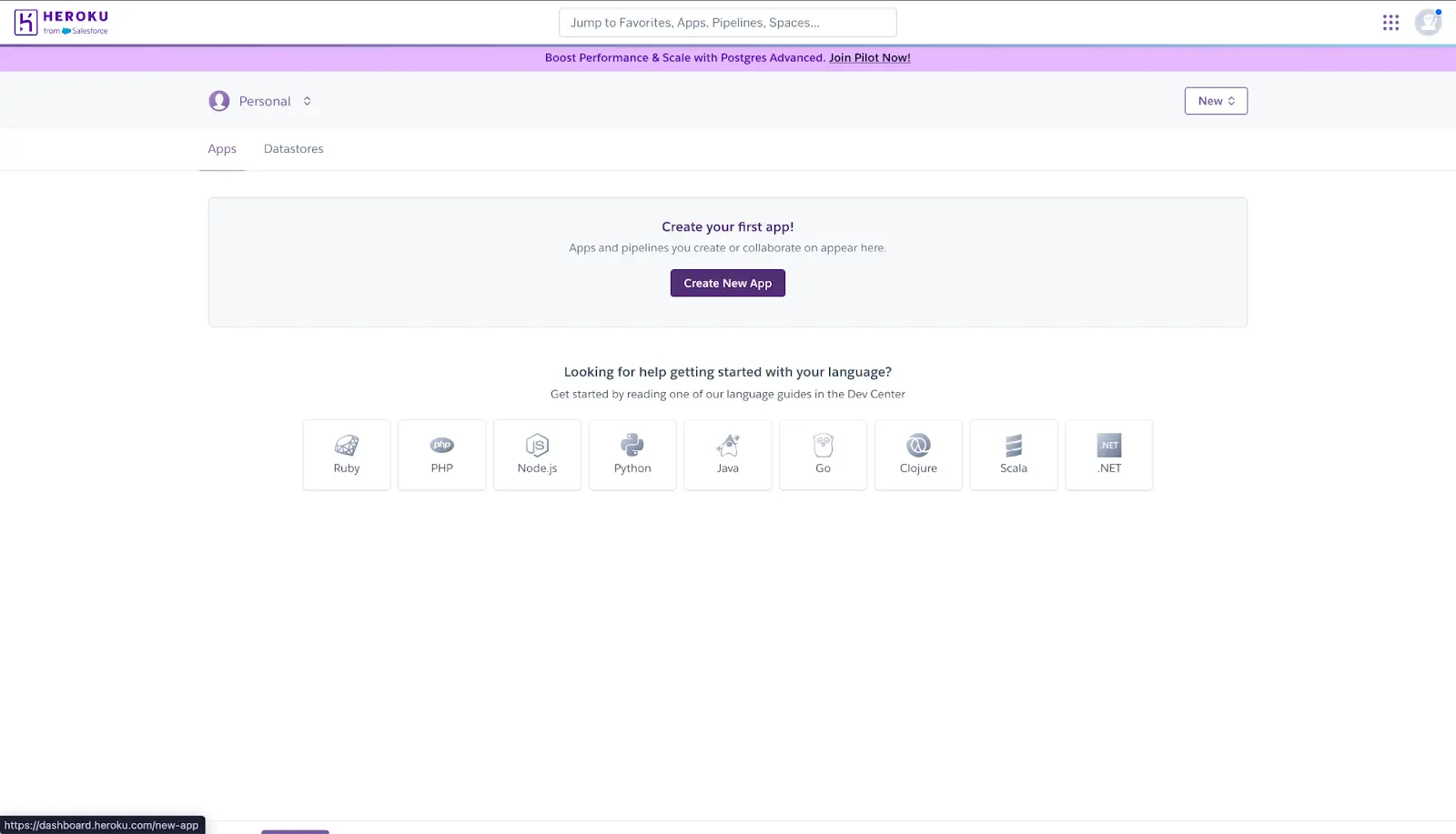
d) Provide an app name, choose a region for the app and click Create app.
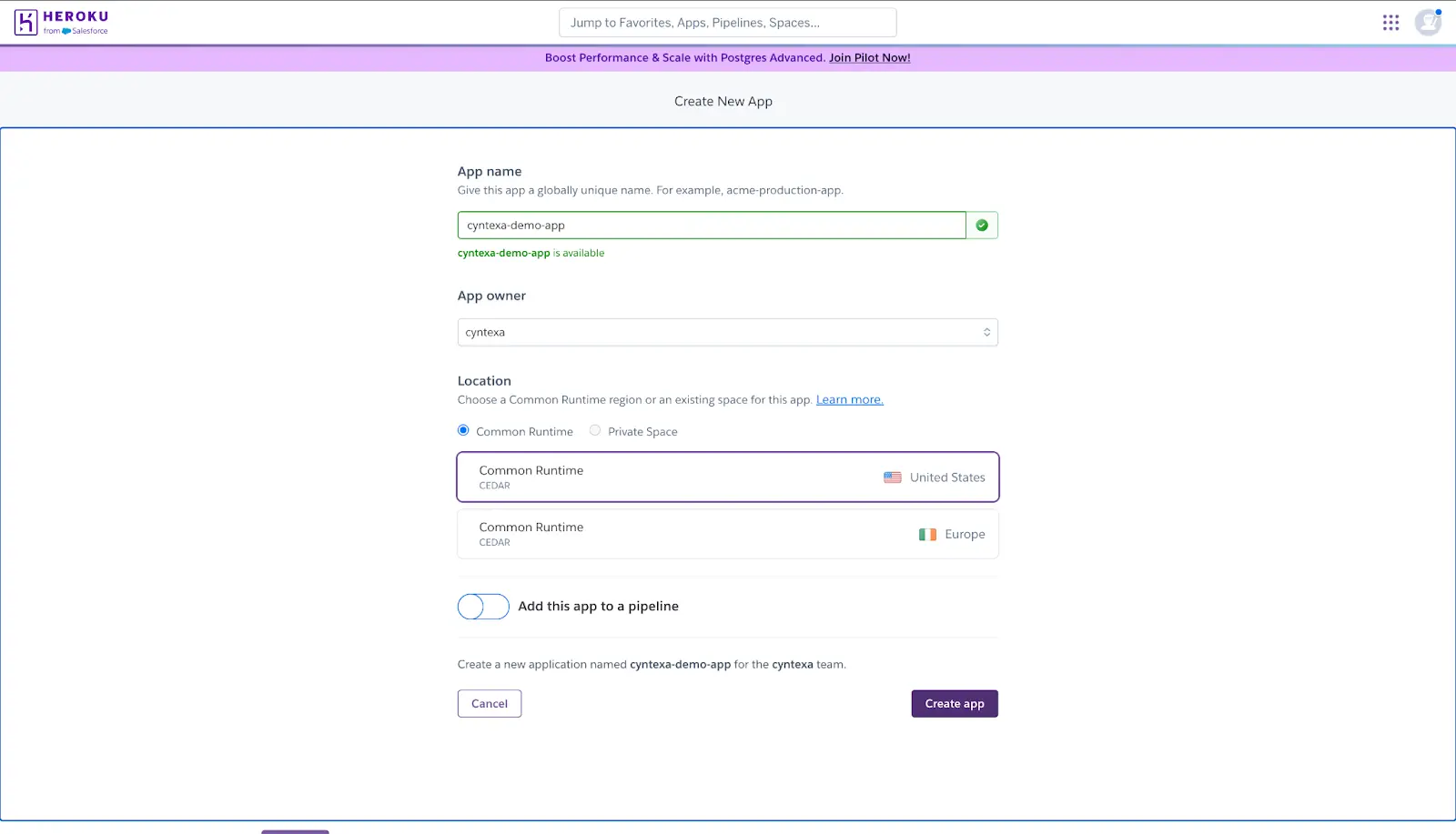
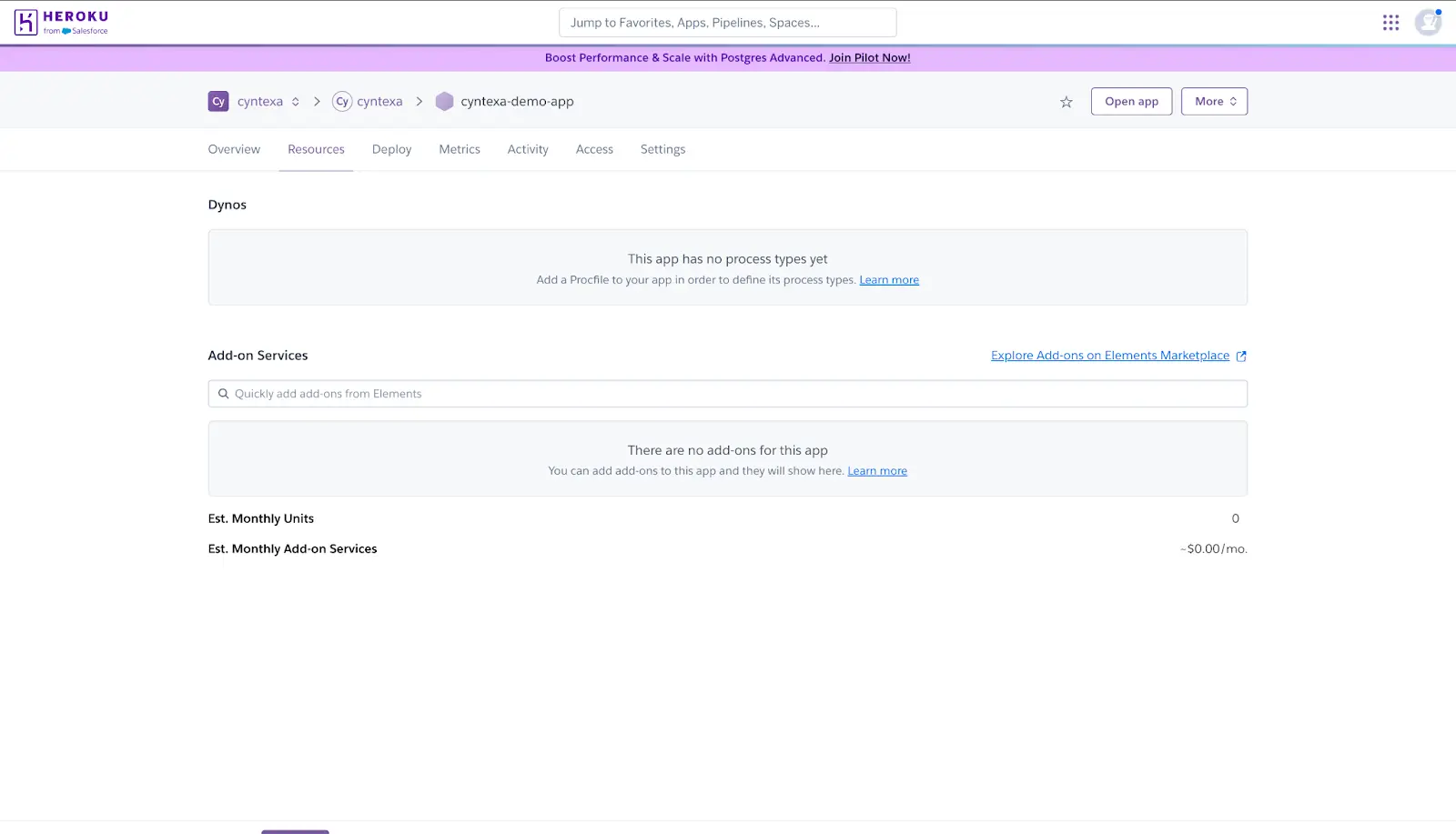
Step 2: Provision the Heroku Connect Add-on in our app
a) The app view loads when the app is created. Click the Resources tab.
b) Click on “Explore Add-ons on Elements Marketplace” hyperlink.
c) Search for Heroku Connect in the Add-ons section.
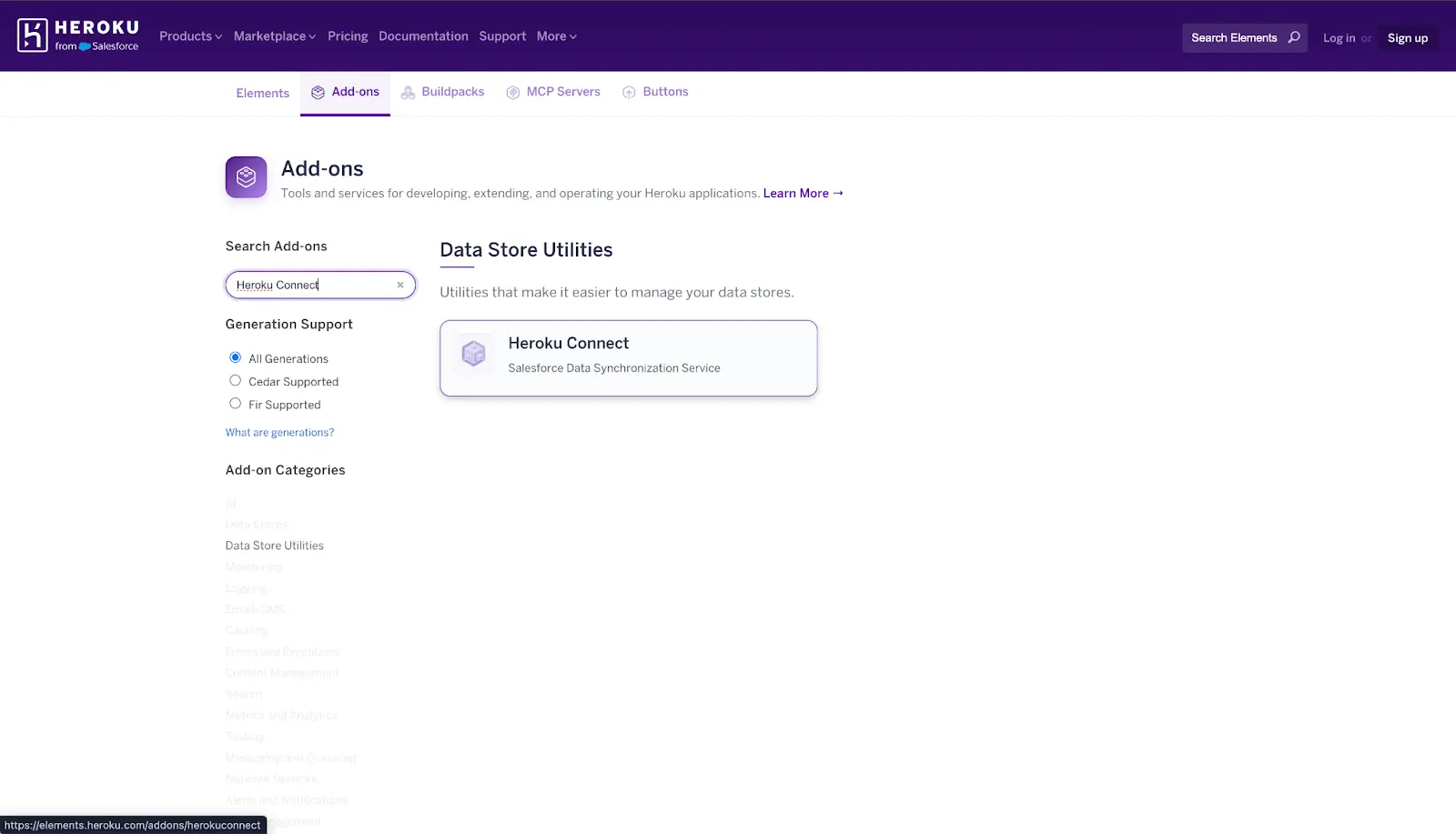
d) Click “Install Add on”
e) Select a plan and click the Submit Order Form button.
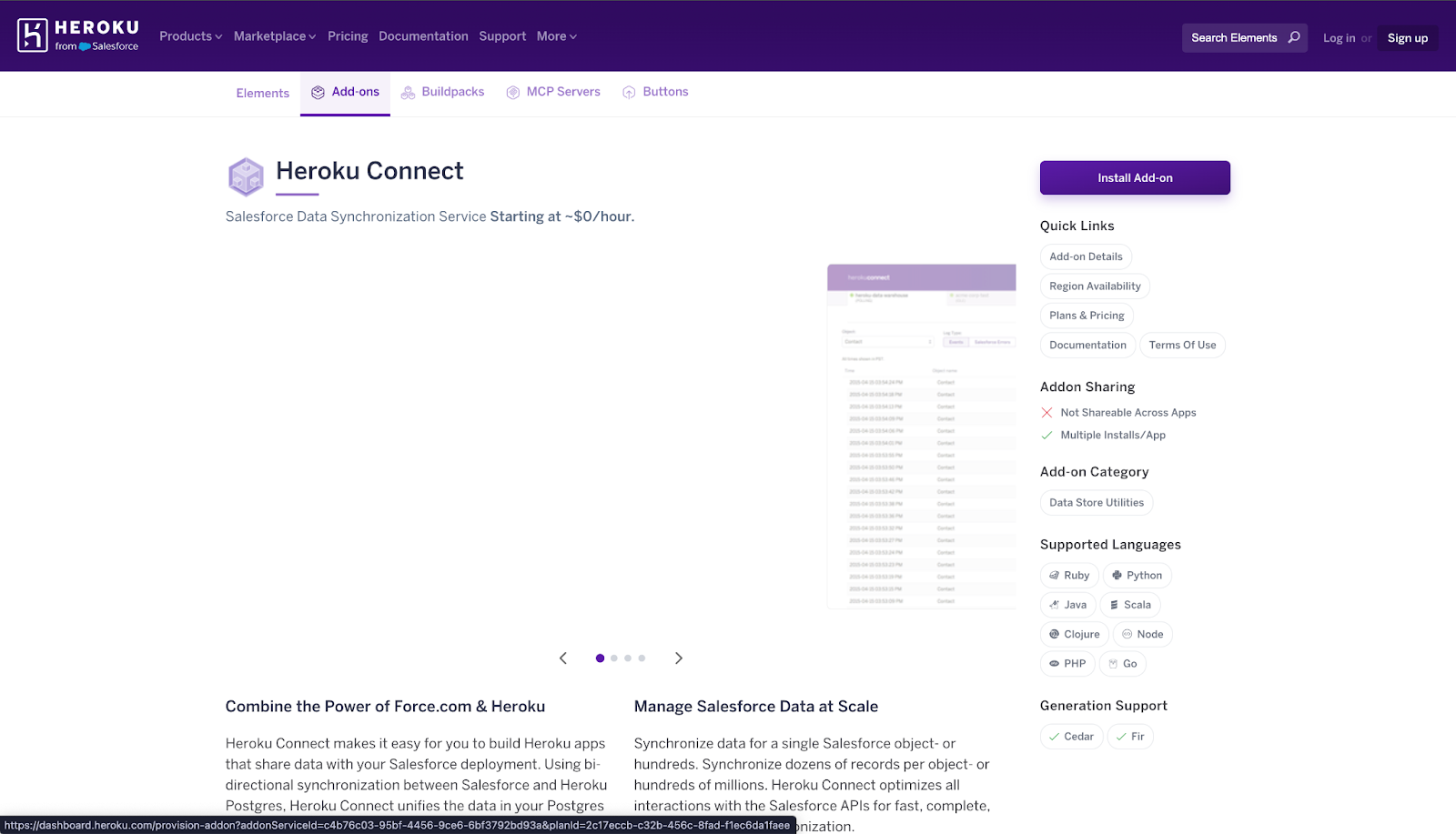
f) Heroku Connect appears in the Add-ons section of your Resources tab when provisioned.
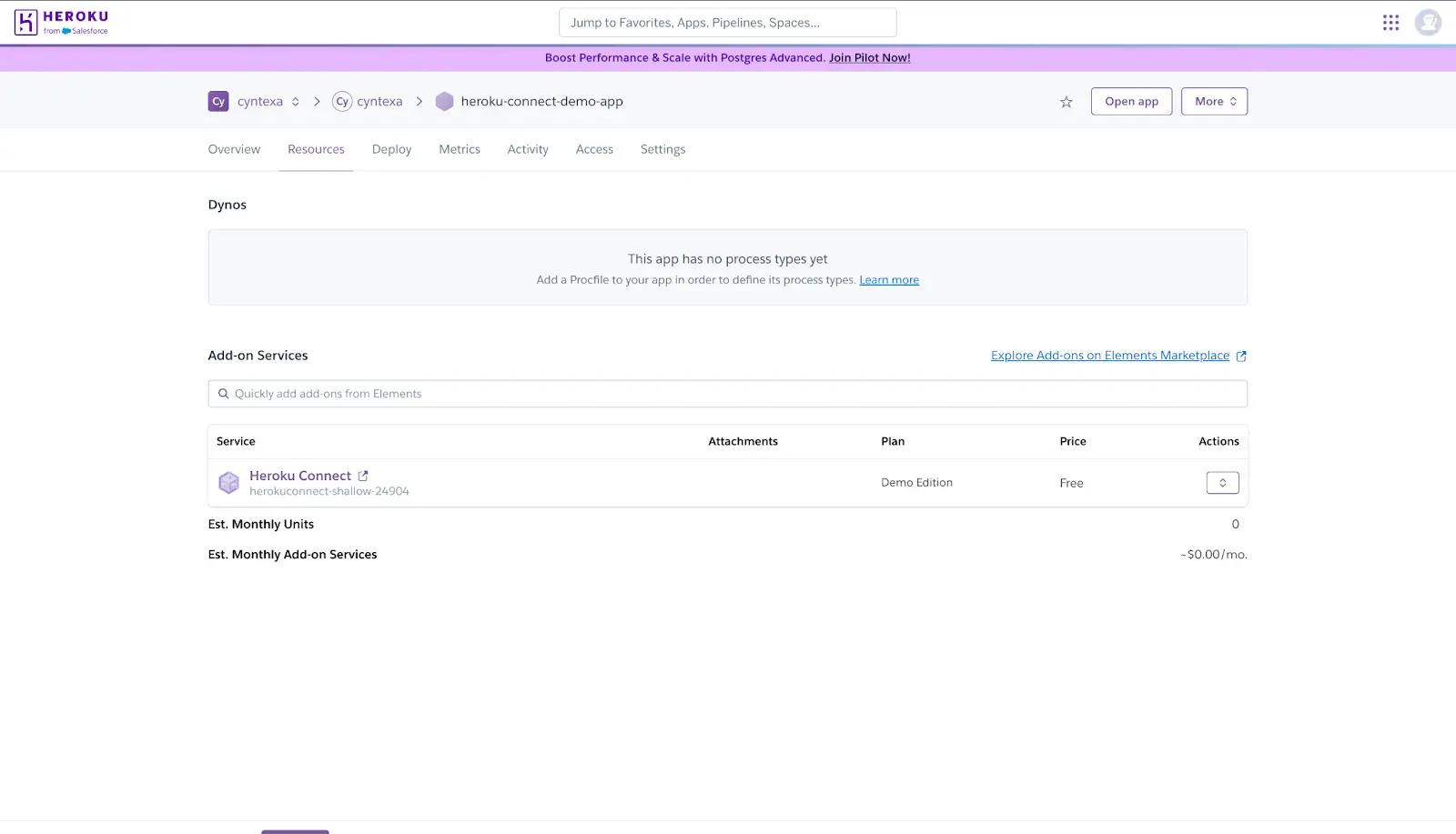
Step 3: Configure Heroku Connect with Heroku Postgres
a) Click the Resources tab of the App.
b) Open the Heroku Connect Dashboard by clicking the add-on on the “Heroku Connect” hyperlink.
c) Click the Setup Connection button in the dashboard.
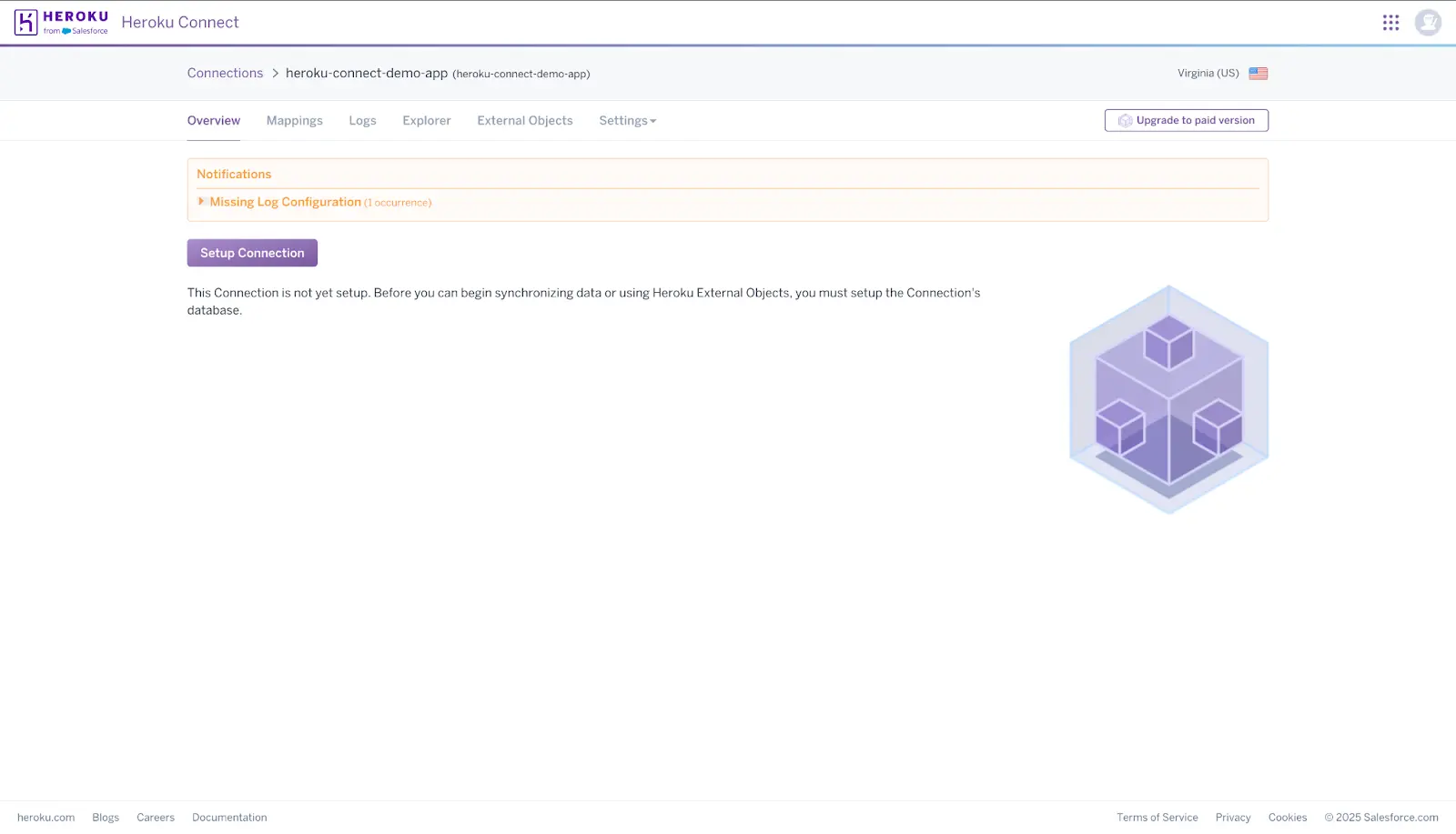
d) Now, we will add Heroku Database Add on in our app
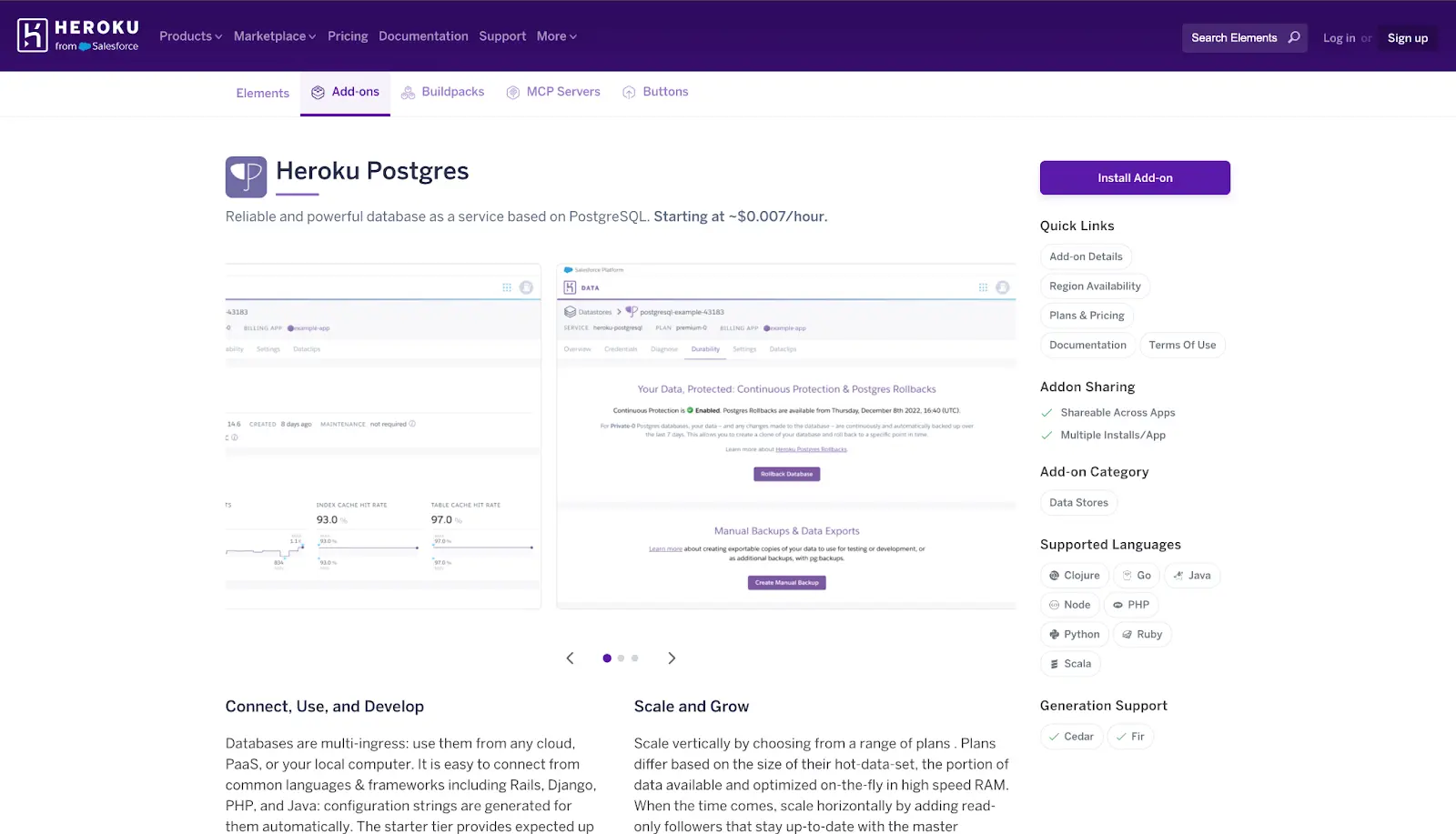
e) Click “Add a database now”
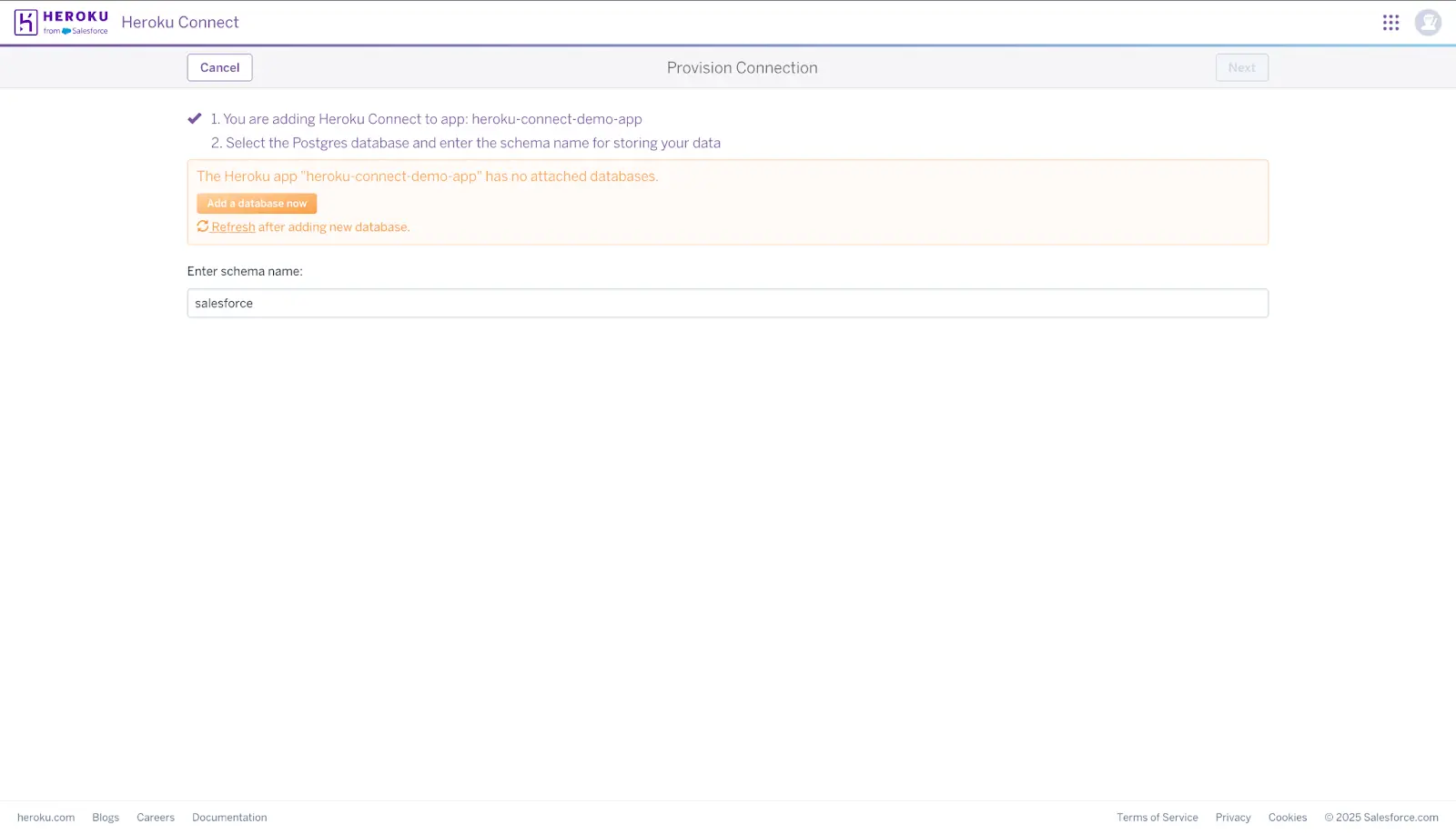
f) A new window will open for the “Heroku Postgres” add-on.
g) Click “Install Add-on”.
h) Select a plan and click the Submit Order Form button.
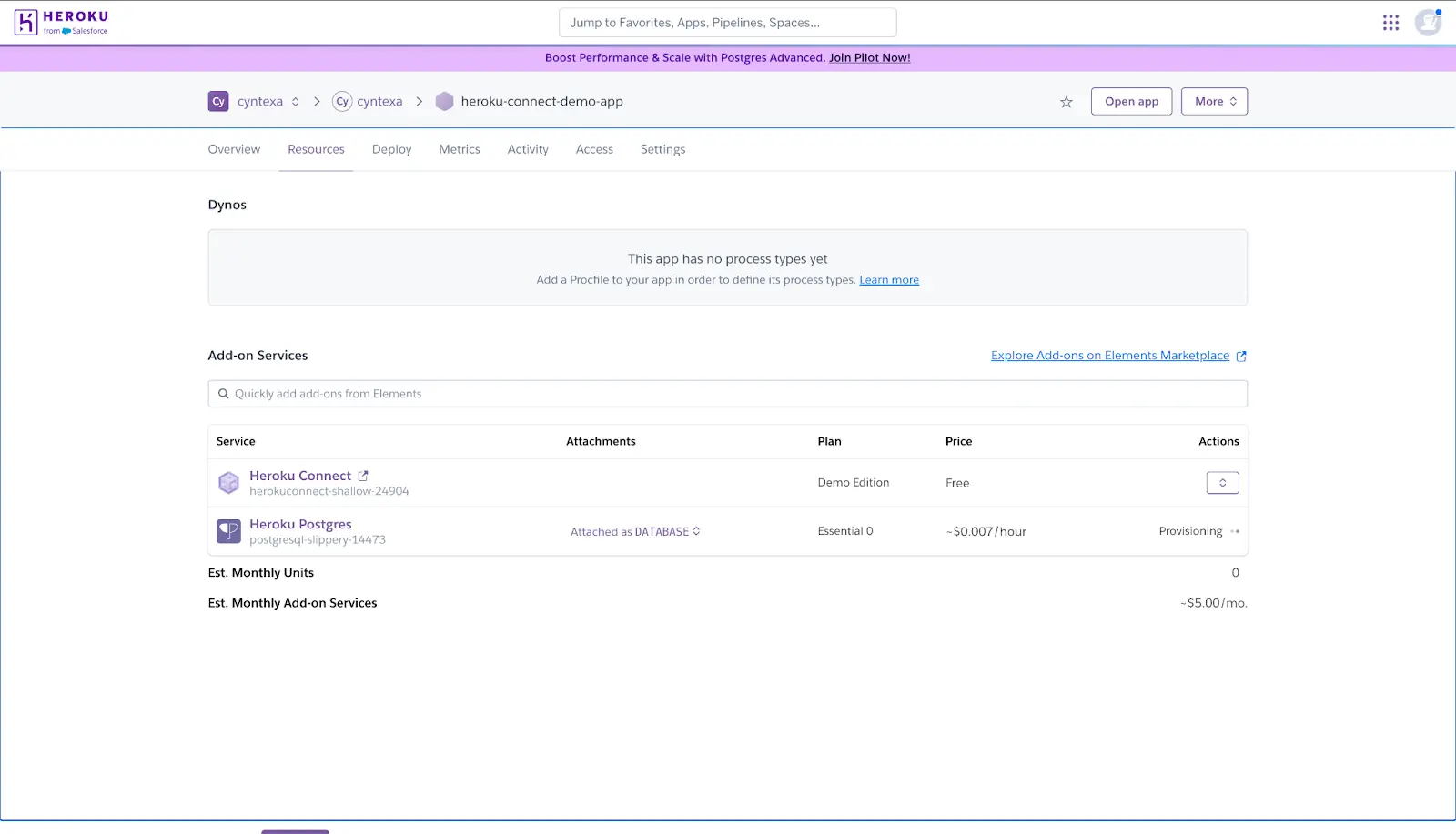
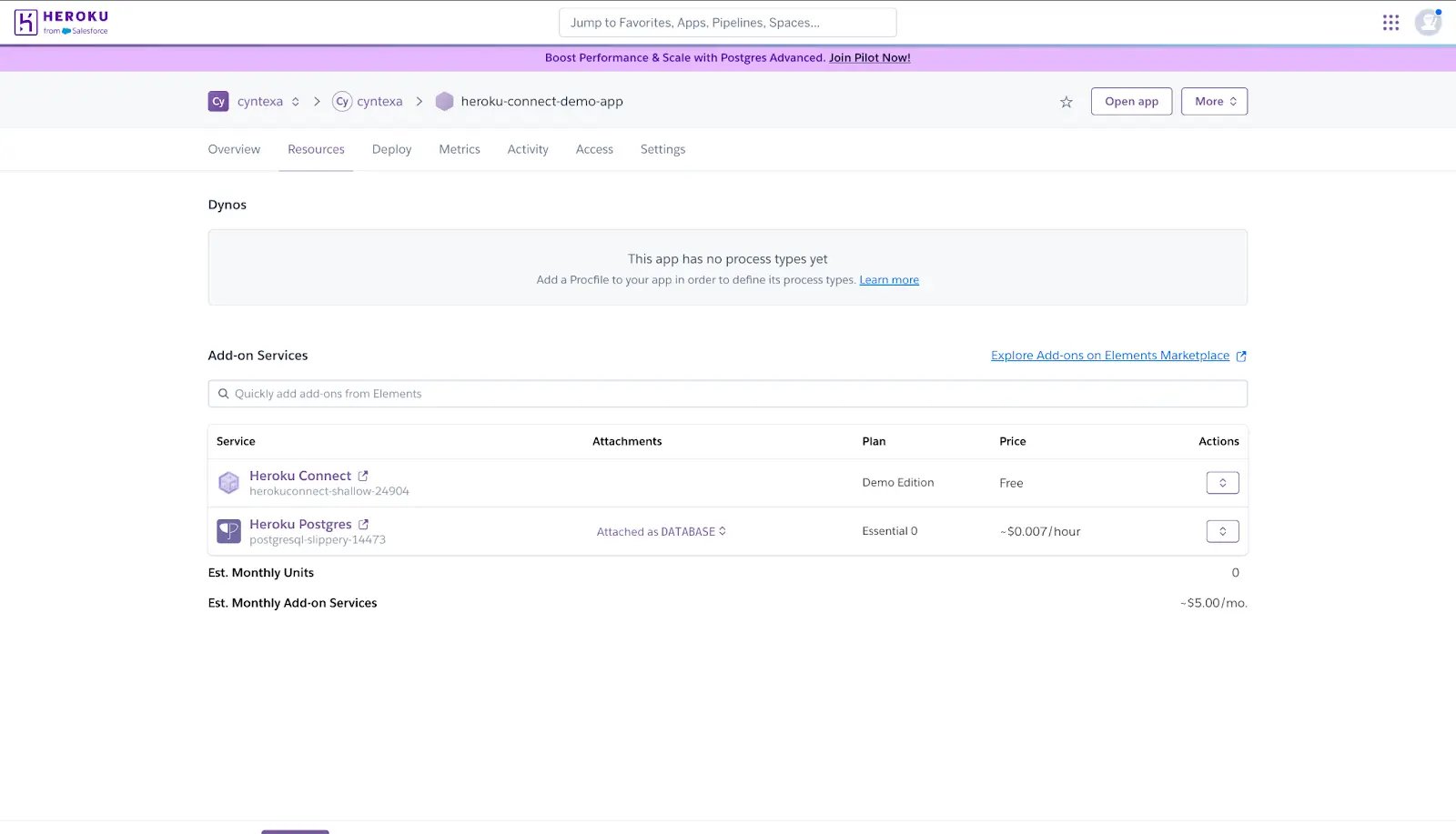
i) Open the Resources tab in the application to monitor the database provisioning status.
j) The provisioning process may take a few minutes to complete.
k) Once provisioning is finished, return to the Heroku Dashboard to continue.
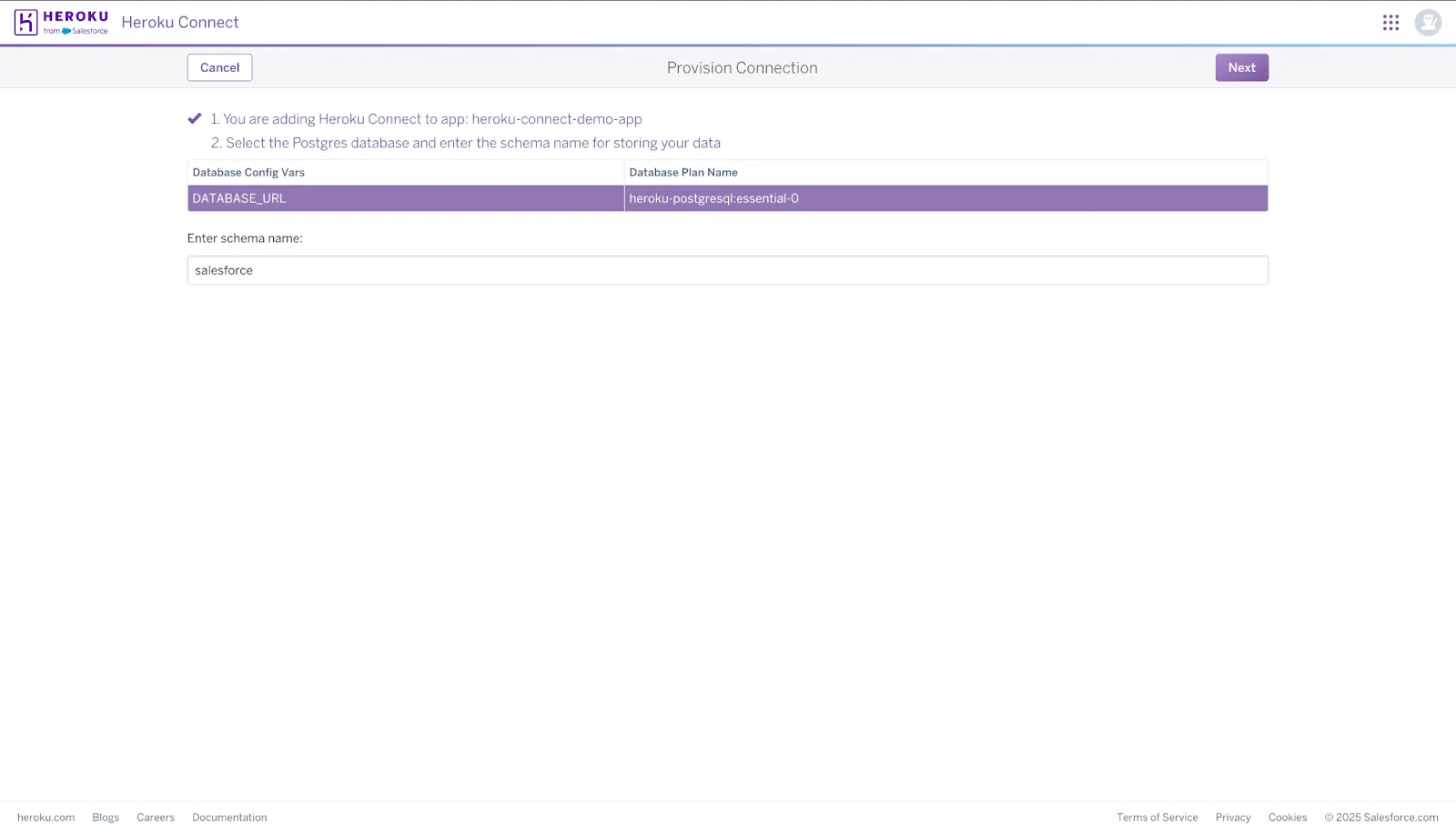
l) Choose a Heroku Postgres database that is attached to your application. If you have multiple databases attached to your application, you can choose the one you want Heroku Connect to use. The database specified by the DATABASE_URL config var is selected by default.
m) Choose the Postgres schema to be used for the tables created by Heroku Connect. The default is Salesforce. You can choose to put your tables in an existing schema, including public, as long as no tables exist in the schema.
n) Click Next to set up the database.
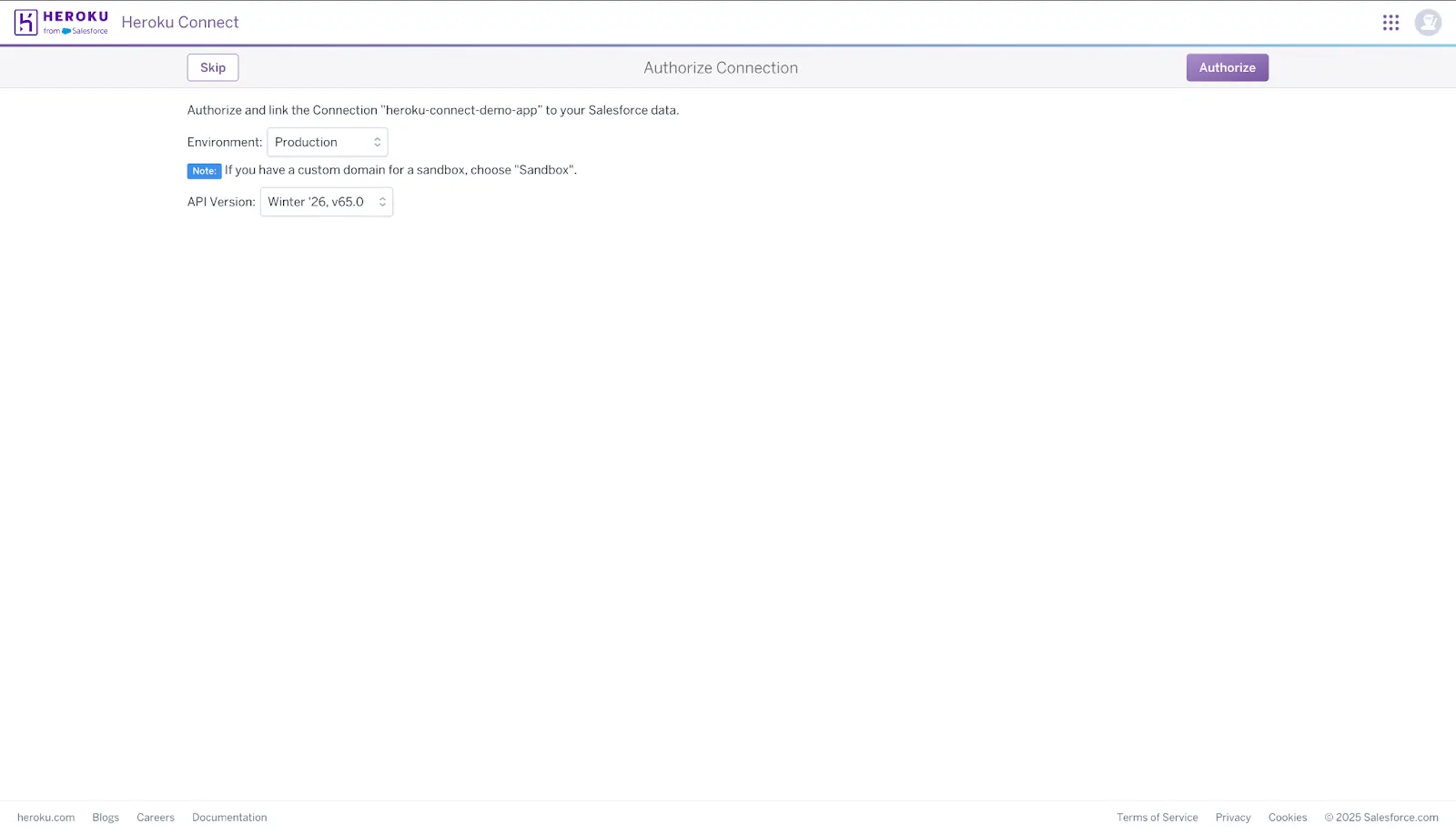
o) Choose to authenticate to a production or sandbox Salesforce org. You can use a custom login domain.
p) Select the Salesforce API version you want Heroku Connect to use. You can’t change the API version after configuring the connection. Recreate the connection to change the API version.
q) Click the Authorize button, and a browser opens for you to enter your Salesforce login credentials and authorize Heroku Connect. It’s recommended to use a dedicated integration user with View All Data permissions.
r) Click “Allow” on Salesforce Access page.
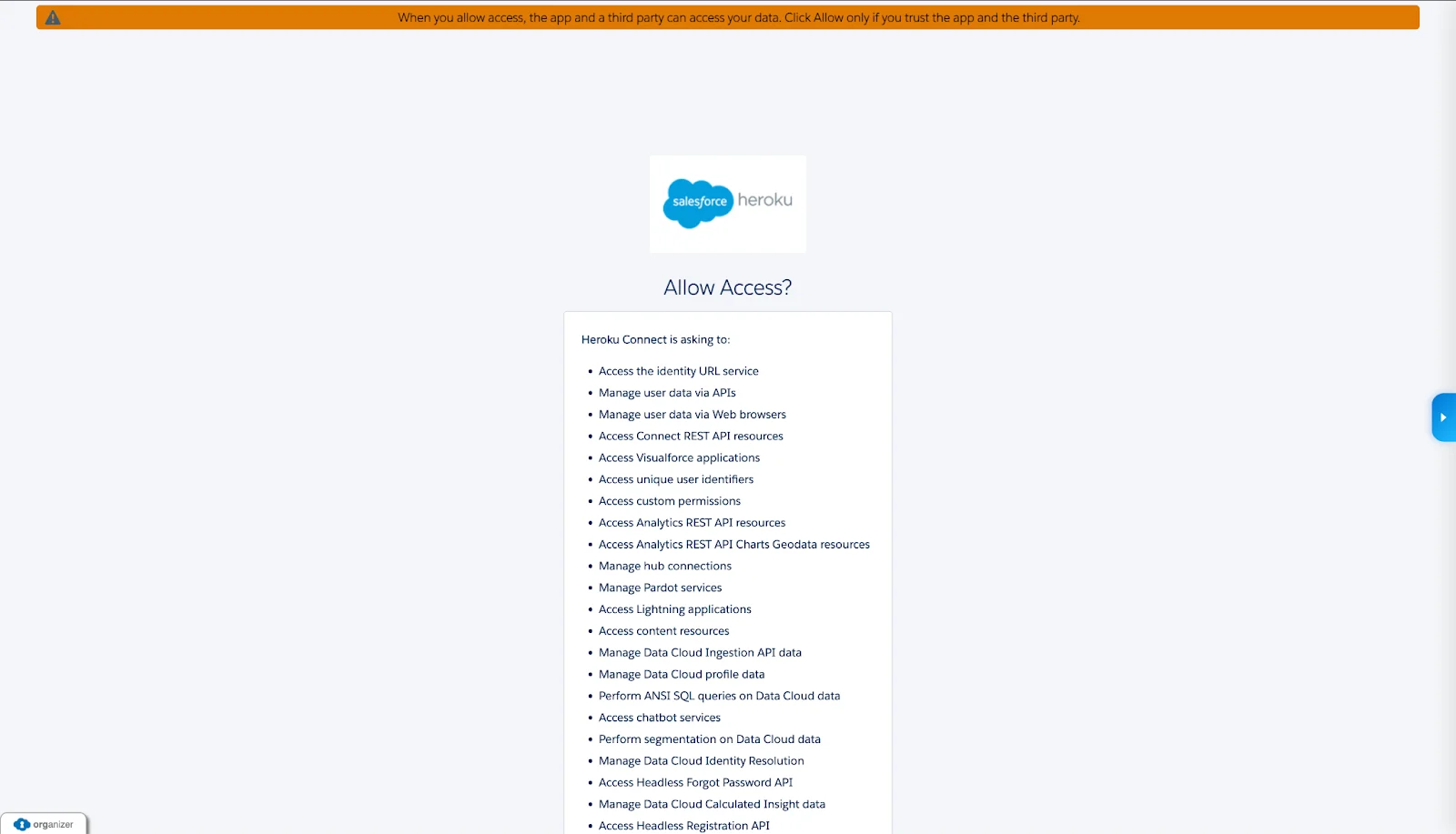
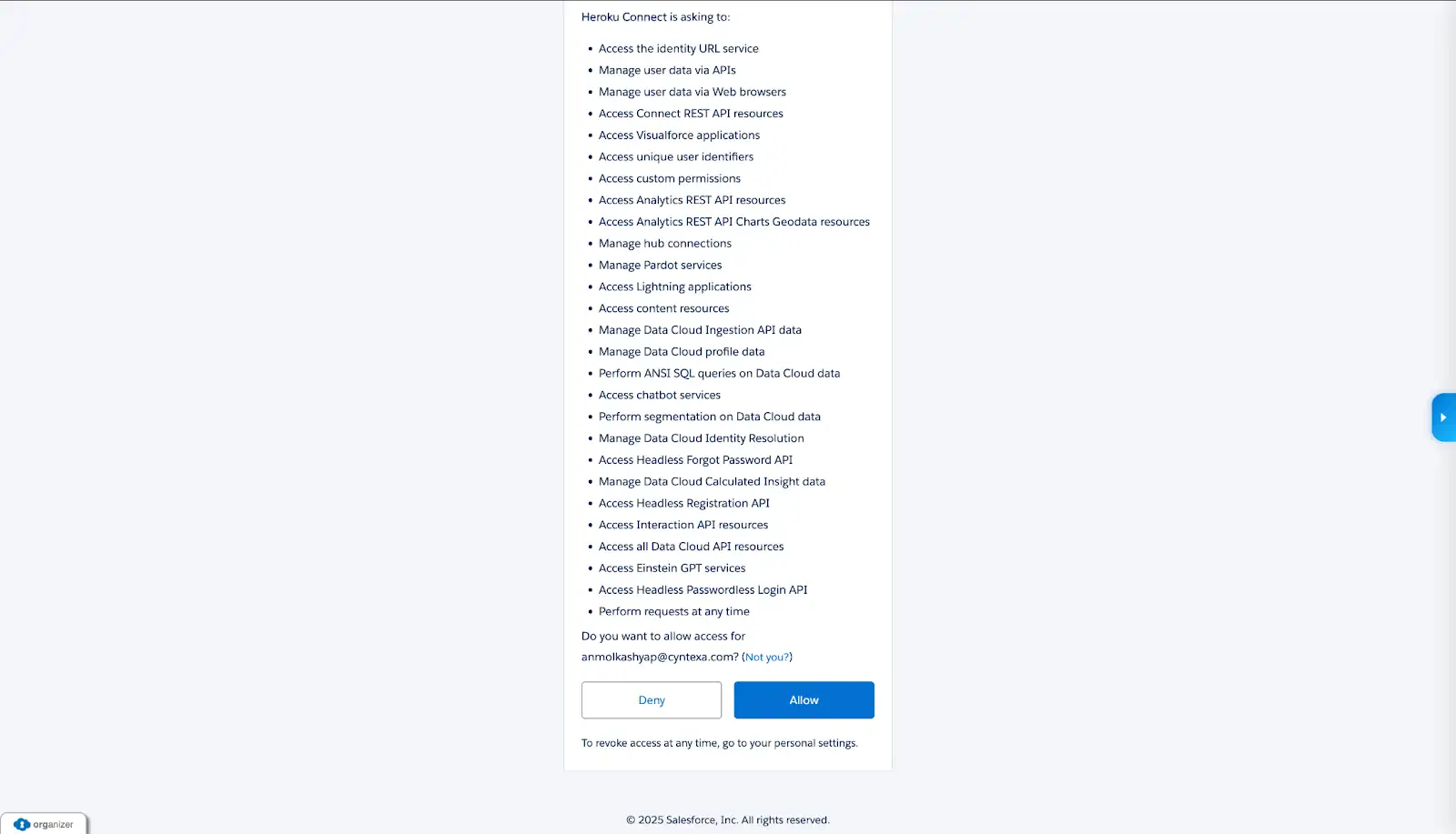
s) After you have authenticated to your Salesforce org, you can check the connection status of Heroku & Salesforce.
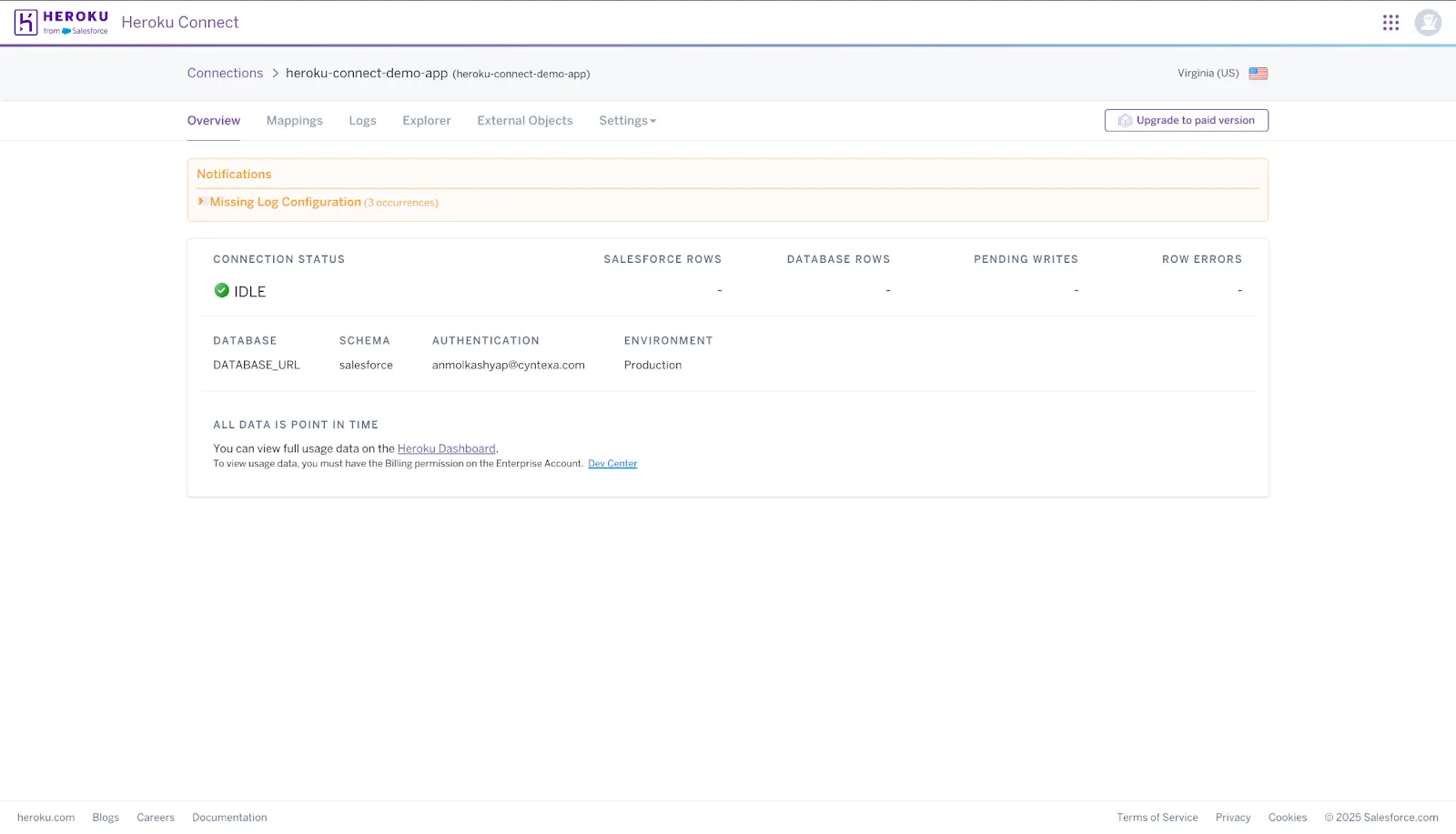
t) Now you can start mapping objects.
Step 4: Set up Mappings
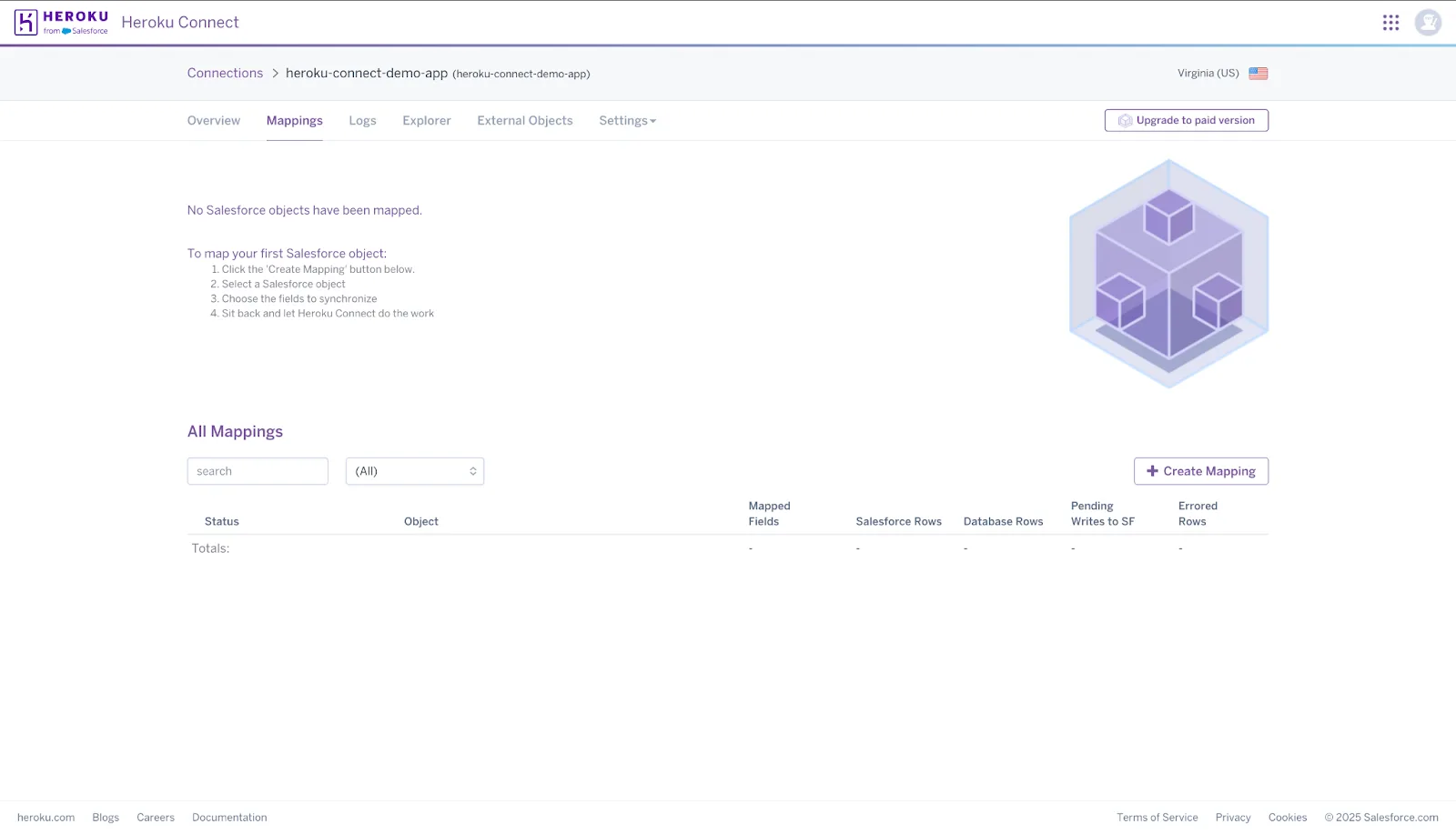
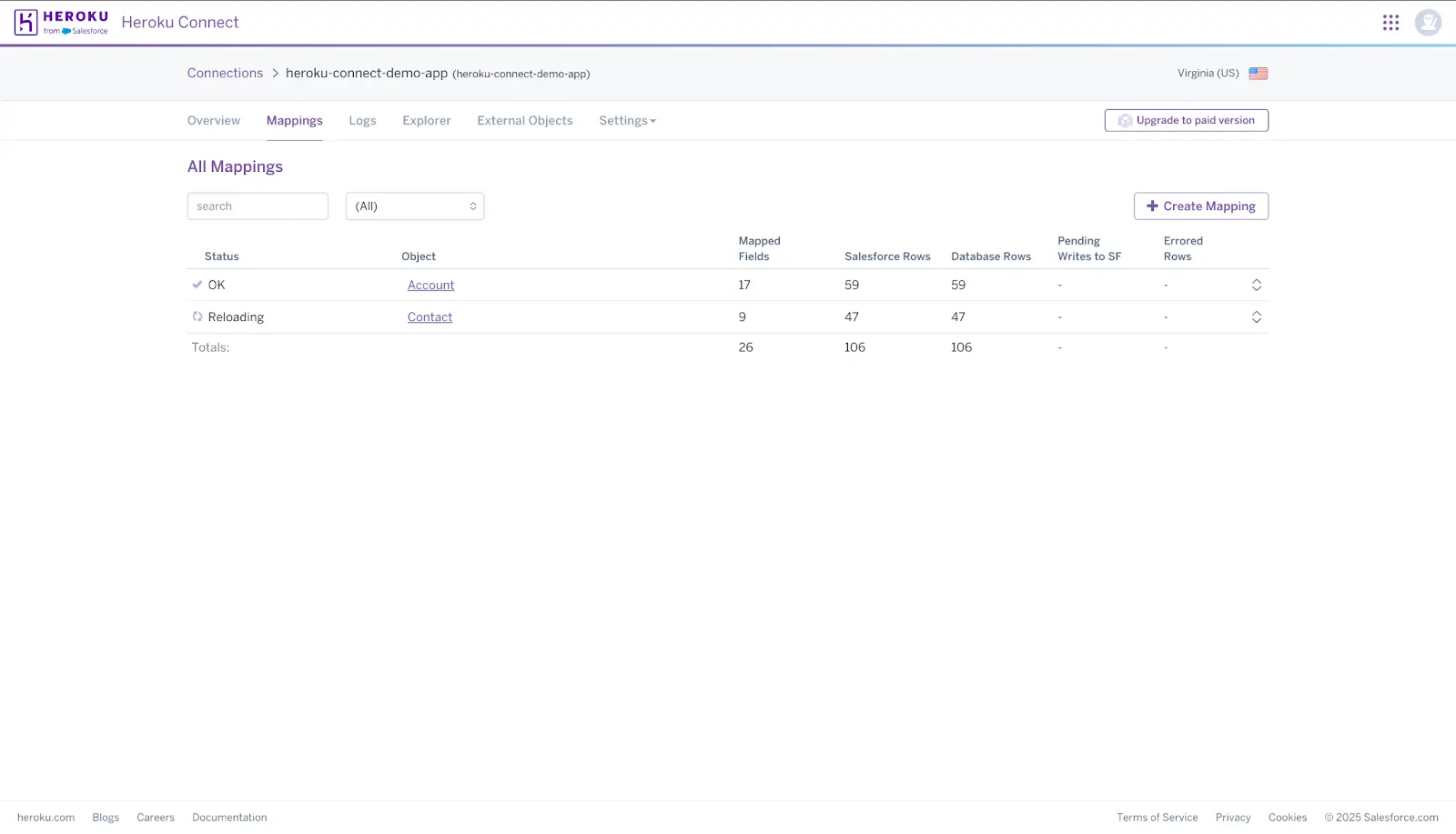
a) Click the Mappings tab on the Heroku Connect Dashboard.
b) Click “Create Mapping”.
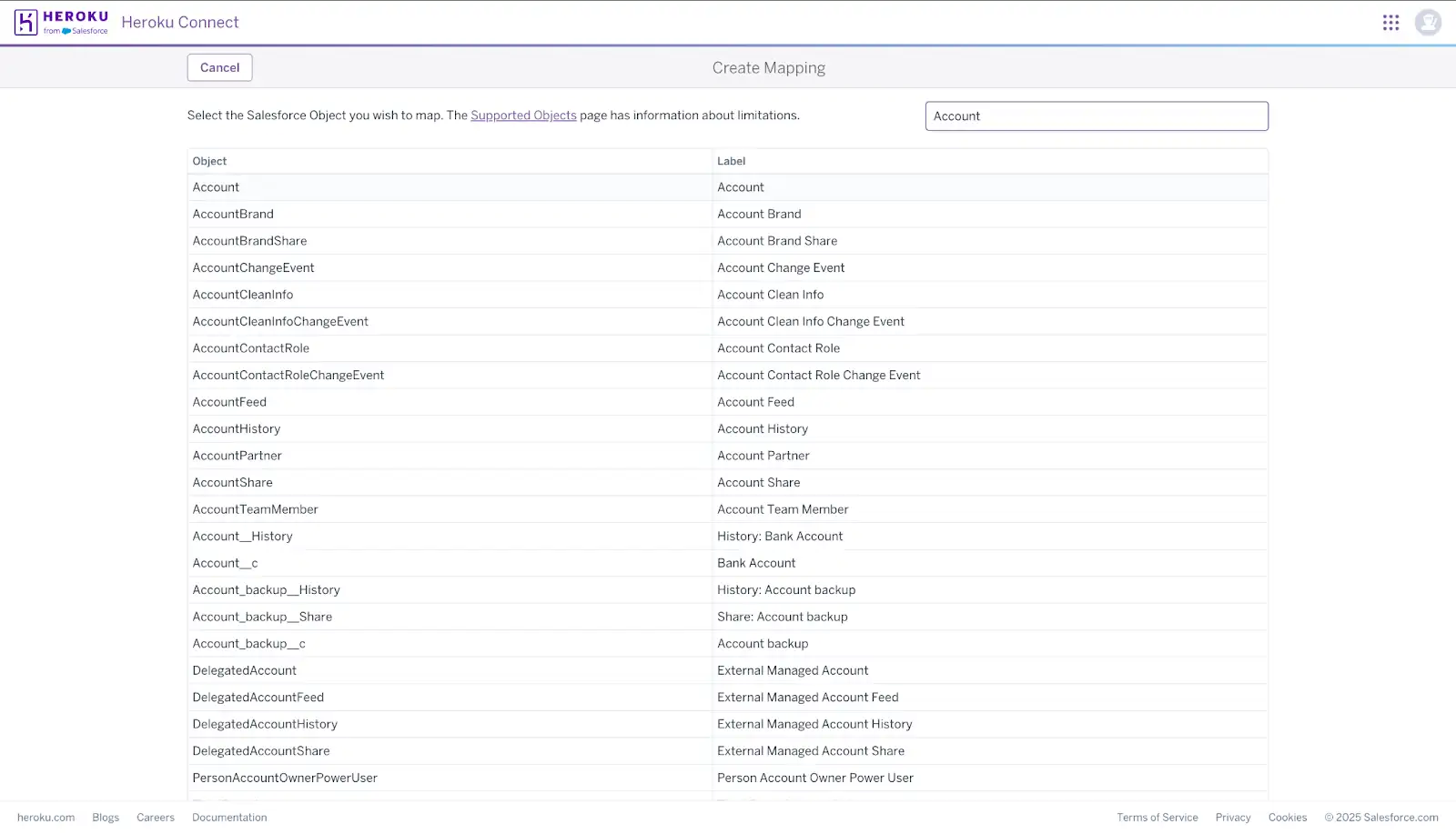
c) Use the search box to filter the list of objects that can be mapped from your Salesforce org. Click the object that you want to map.
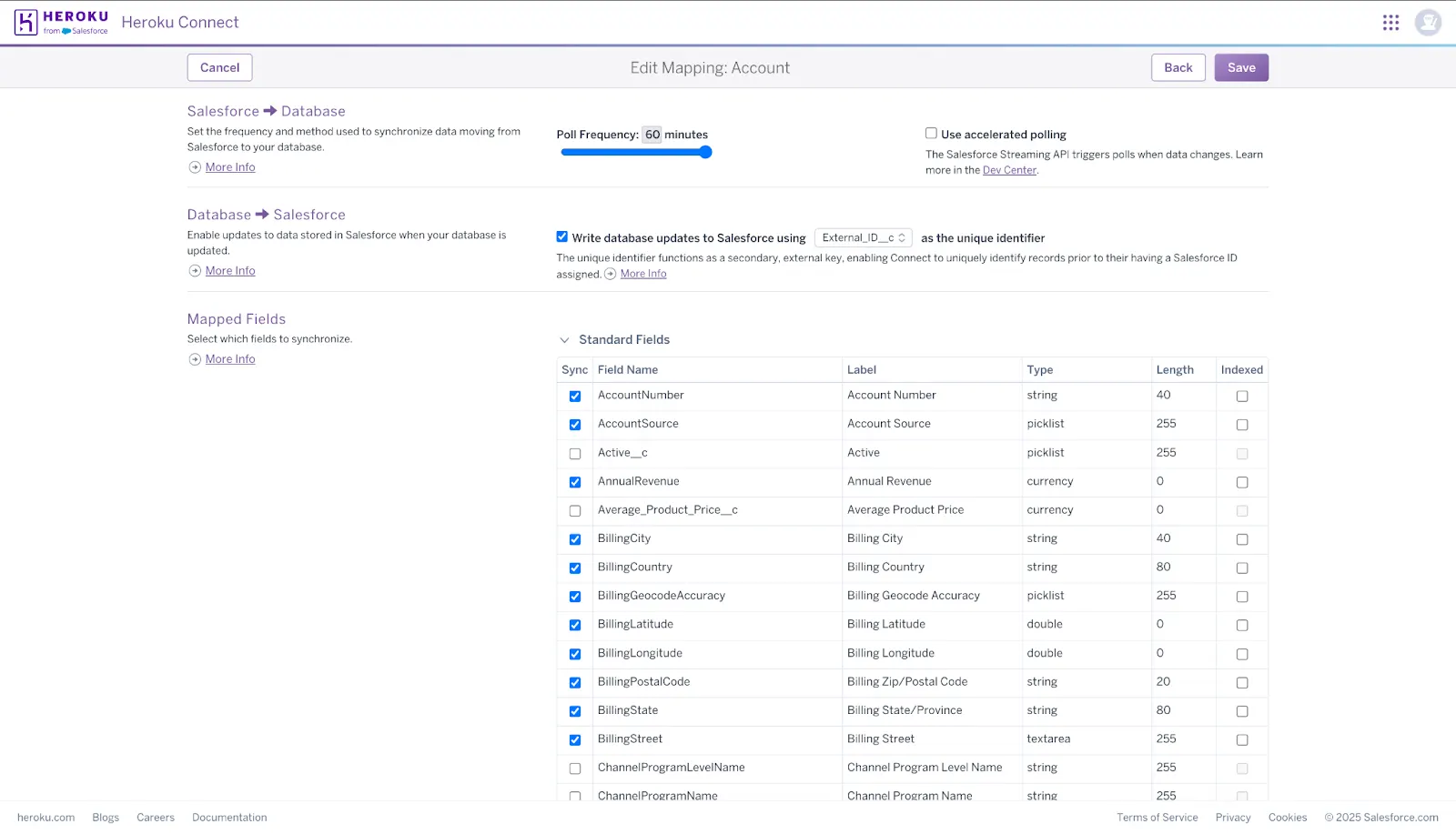
d) Choose the synchronization options, including choosing between a read-only or a read-write mapping.
e) Select the fields that you want to map. Some fields in the list are pre-selected and can’t be removed from the mapping as they’re required for Heroku Connect to perform synchronization.
f) Click Save.
g) Heroku Connect creates a table in your database corresponding to the Salesforce object. It queries for all records from Salesforce and inserts them into the mapped table.
h) The Status column indicates a mapping’s sync state.
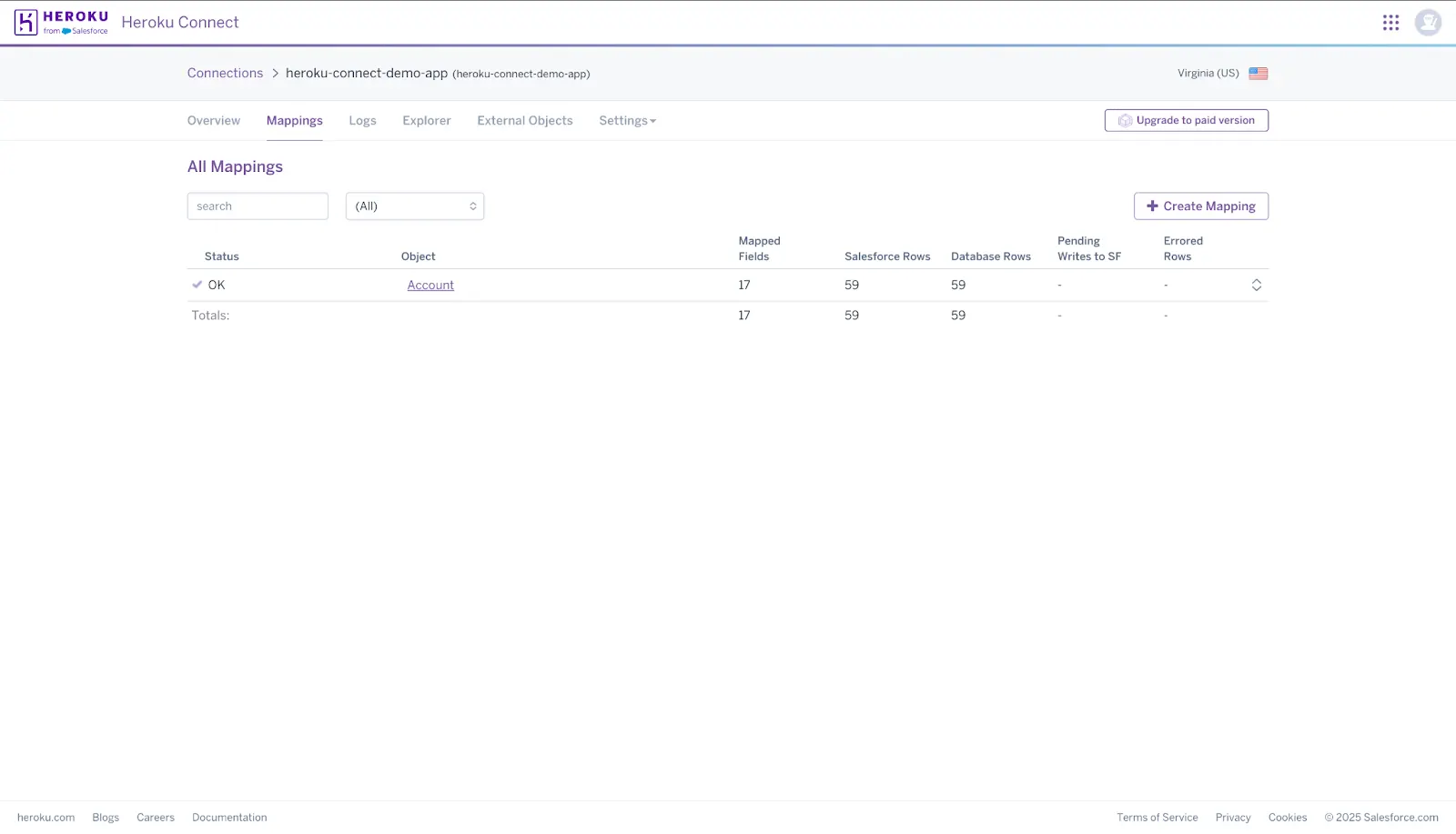
i) Repeat same steps for multiple objects.
Step 5: Check Logs (Optional)
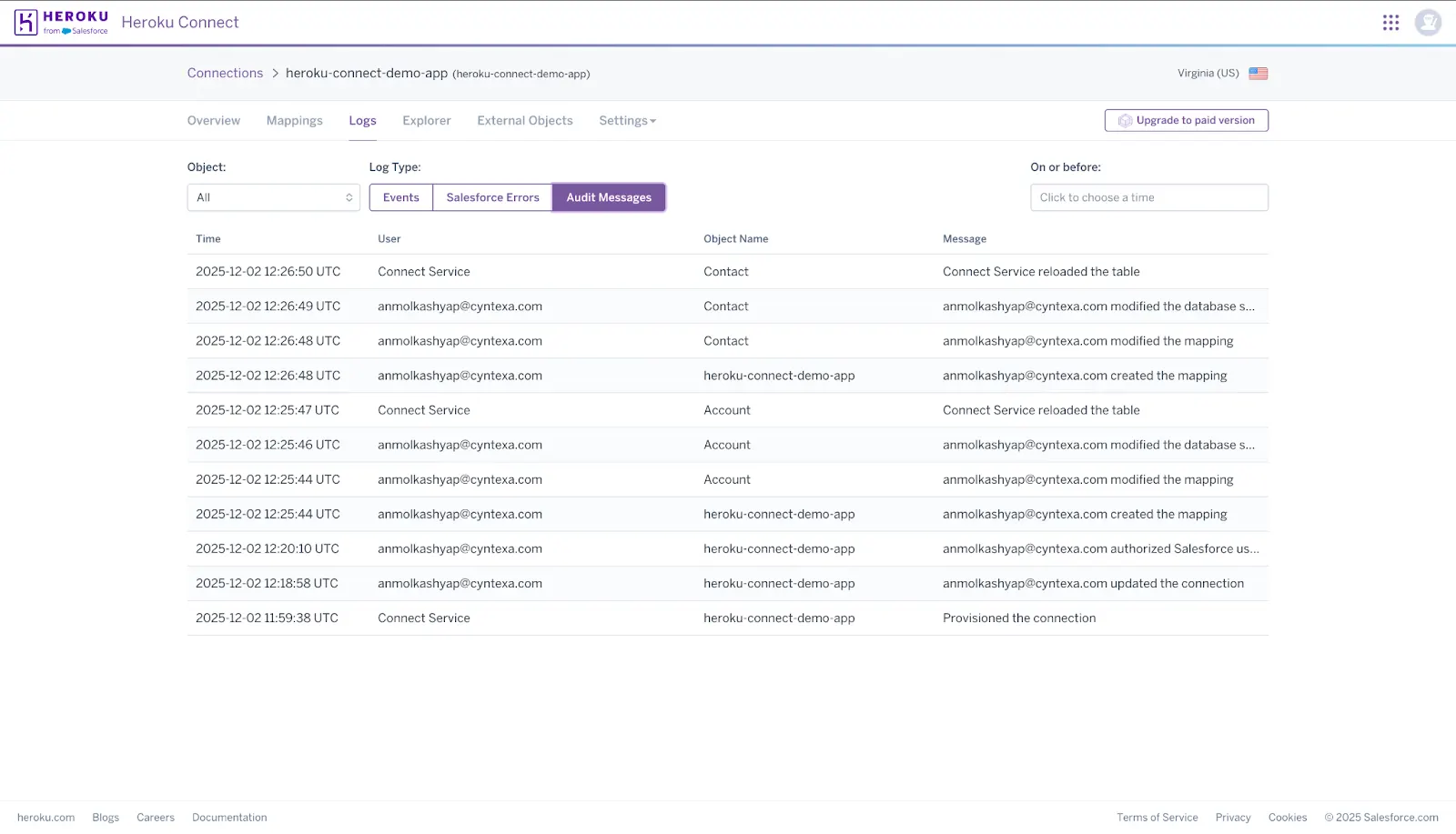
a) Click the Logs tab on the Heroku Connect Dashboard
b) You can review the Heroku Salesforce Data Sync logs based on events and errors.
Heroku Connect setup is just the start. Ensuring it scales well, stays secure, and aligns with your Salesforce data model takes the right expertise.
With hands-on experience across both platforms, Cyntexa supports teams in making smarter architecture decisions and building sync flows that last.
Security, Networking and Governance for Salesforce–Heroku Integration
A Salesforce–Heroku architecture only performs at enterprise scale when security and governance are designed with intent. The following controls anchor reliability, trust and operational consistency.
1. Authentication and Credential Strategy
Make sure Salesforce and Heroku recognize each other securely, and only authorized tools can access data.
| OAuth 2.0 and Token Management | Heroku AppLink |
|---|---|
| Salesforce and Heroku use secure tokens to communicate instead of storing passwords in code. These tokens are protected and updated regularly to keep access safe. | AppLink provides temporary, tightly scoped credentials that reduce the risk of misuse and allow better tracking of who accessed what. |
2. Network Architecture and Traffic Controls
Keep data moving safely between systems and ensure only trusted paths are allowed.
| Private Spaces | IP Allowlisting and Access Policies |
|---|---|
| Heroku apps run in a private network with fixed IPs, so Salesforce can easily verify and trust where the traffic is coming from. | Only approved Salesforce and Heroku network addresses can connect. All communication happens over secure HTTPS routes, so nothing travels unprotected. |
3. Data Protection and Encryption Controls
Protect data both when it is traveling and when it is stored.
| Encryption in Transit | Encryption at Rest |
|---|---|
| Every interaction between Salesforce and Heroku uses secure, encrypted connections to prevent eavesdropping. | Databases and storage within Heroku are encrypted automatically. For sensitive industries like healthcare or finance, Shield technologies add even stronger protections and custom encryption keys. |
4. Governance Framework and Integration Guardrails
Maintain control over what data is shared, how changes are tracked, and how environments are managed.
| Data Access Governance | Auditability and Monitoring |
|---|---|
| Teams decide which specific Salesforce fields and records Heroku apps can access. These settings are reviewed often to avoid sharing more data than necessary. | Both platforms provide logs and alerts so teams always know who made changes and whether any part of the integration needs attention. |
| Environment Separation | Architectural Guardrails |
| Work is done in development and testing environments first, and only reliable changes reach production, where real users and data exist. | Every new integration or connection follows approval and security checks to ensure it aligns with business policies and privacy standards. |
Operational Watchouts: What to Monitor with Heroku Connect
Even with its rock-solid architecture, Heroku Connect has edge cases that sometimes can affect data reliability and system behaviour. Here are some operational watchouts to look for:
| Area | What to Watch | Why It Matters |
|---|---|---|
| Object Permissions | The Salesforce user must have “View All” for mapped objects. | Missing permissions will silently break sync jobs. |
| Schema Changes | Salesforce schema updates don’t auto-apply to Postgres. | Manual remapping is required to avoid sync failure or corruption. |
| Unsupported Objects | Some standard objects, like Knowledge, can’t be mapped. | You may need alternate sync strategies or APIs. |
| Conflict Handling | No built-in resolution if Salesforce and Heroku write the same record. | The last write wins. Build logic to detect or prevent collisions. |
| Data Rollbacks | Truncating Postgres breaks Connect’s high-water-mark sync logic. | You must reload mappings to restore consistency. |
| Streaming Limits | Connect auto-generates PushTopics and uses CDC behind the scenes. | These count against platform event limits and must be monitored. |
| Monitoring Discipline | Sync failures, permission issues, and API errors show up only in logs. | Set up alerts, dashboards, and regular audits across environments. |
Pro Tip: Use one-way sync for read-heavy apps to avoid write conflicts. Always test schema changes in staging before pushing to production.
The Final Note
Integration is no longer plumbing. It is a growth strategy. When Salesforce and Heroku operate as one ecosystem, customer intelligence flows into the experiences that differentiate the brand, and operational truth flows back without delay. That loop determines which companies scale efficiently and which stall under complexity.
Cyntexa is the Heroku consulting partner that ensures the loop stays fast, secure, and adaptable. We help leaders choose architectures that support high-traffic engagement, real-time data movement, and modern application delivery without introducing fragility.
The future of digital scale is already here. Let’s build it into your architecture.
Don’t Worry, We Got You Covered!
Get The Expert curated eGuide straight to your inbox and get going with the Salesforce Excellence.
AUTHOR
Vishwajeet Srivastava
Salesforce Data Cloud, AI Products, ServiceNow, Product Engineering
Co-founder and CTO at Cyntexa also known as “VJ”. With 10+ years of experience and 22+ Salesforce certifications, he’s a seasoned expert in Salesforce Data Cloud & AI Products, Product Engineering, AWS, Google Cloud Platform, ServiceNow, and Managed Services. Known for blending strategic thinking with hands-on expertise, VJ is passionate about building scalable solutions that drive innovation, operational efficiency, and enterprise-wide transformation.


Cyntexa.
Join Our Newsletter. Get Your Daily Dose Of Search Know-How