



Salesforce Revenue Cloud: Everything You Need To Know
source on Google

Table of Contents
source on Google
Managing quote-to-cash sounds like enough, but reality is, it covers only part of what today’s revenue teams are responsible for. The revenue lifecycle is bigger and more complex. Revenue starts before a quote is created, with your product catalog, pricing logic and approval rules, and continues long after cash is received, through renewals, usage charges, contract changes and revenue recognition.
This lifecycle demands more than just a CPQ tool. It needs automation, integrations, data accuracy and security across systems. It’s about eliminating gaps, speeding up cash flow, improving customer trust and scaling RevOps (revenue operations) without adding complexity.
The answer to all this is Salesforce Revenue Cloud, which was rebranded as Agentforce Revenue Management at Dreamforce 2025. This blog will uncover what it is, how it works, key use cases, and most importantly, whether it is better than a regular CPQ tool or not.
What is Salesforce Revenue Cloud?
Revenue cloud is a suite designed to manage the entire revenue lifecycle, from product configuration and quoting through contracts, billing, and revenue recognition.
It combines the power of CPQ, contract lifecycle management, and billing in one platform. In technical terms, Revenue Cloud is fully native on the Salesforce platform and API-first, meaning every pricing, quoting, and revenue process is exposed via APIs for smooth flexibility.
Important Note:
Revenue Cloud emerged from Salesforce’s evolving CPQ strategy. Salesforce acquired the SteelBrick CPQ application (the old managed package CPQ) years ago, and also built new industry CPQ solutions (from the Vlocity acquisition).
Since then, the revenue solutions have seen a major shift in strategy over the past year. What originally launched as Revenue Lifecycle Management (RLM) in Spring ’24 was reintroduced as Revenue Cloud Advanced (RCA), then rebranded again at Dreamforce 2025 as Agentforce Revenue Management (ARM). They made the shift from legacy managed packages to a modern API-first architecture. Today, “Revenue Cloud Advanced” (RCA) essentially replaces and extends the old CPQ/Billing products.
Today, Revenue Cloud comes in two primary SKUs:
- Revenue Cloud Advanced is the core CPQ and order management engine, designed to handle everything from configurations to complex deal structures.
- Revenue Cloud Billing is focused on invoicing, subscription billing, and revenue operations to support recurring and usage-based business models.
Even though the term “Advanced” appears in the SKU, think of it more as an edition name rather than a tier of complexity. In practice, most teams refer to both simply as Revenue Cloud.
For existing Salesforce CPQ customers:
Salesforce announced that the current managed package CPQ licenses will continue to function, but Salesforce’s future innovation is clearly focused on the native Revenue Cloud platform. That means if you’re looking for deeper automation, AI integration, or a more seamless quote-to-cash journey, Revenue Cloud is where the real action is happening.
Key consideration: A Salesforce Sales Cloud or Service Cloud license is required as the base CRM, and Revenue Cloud user licenses are sold as an add-on to that.
Salesforce Revenue Cloud Features
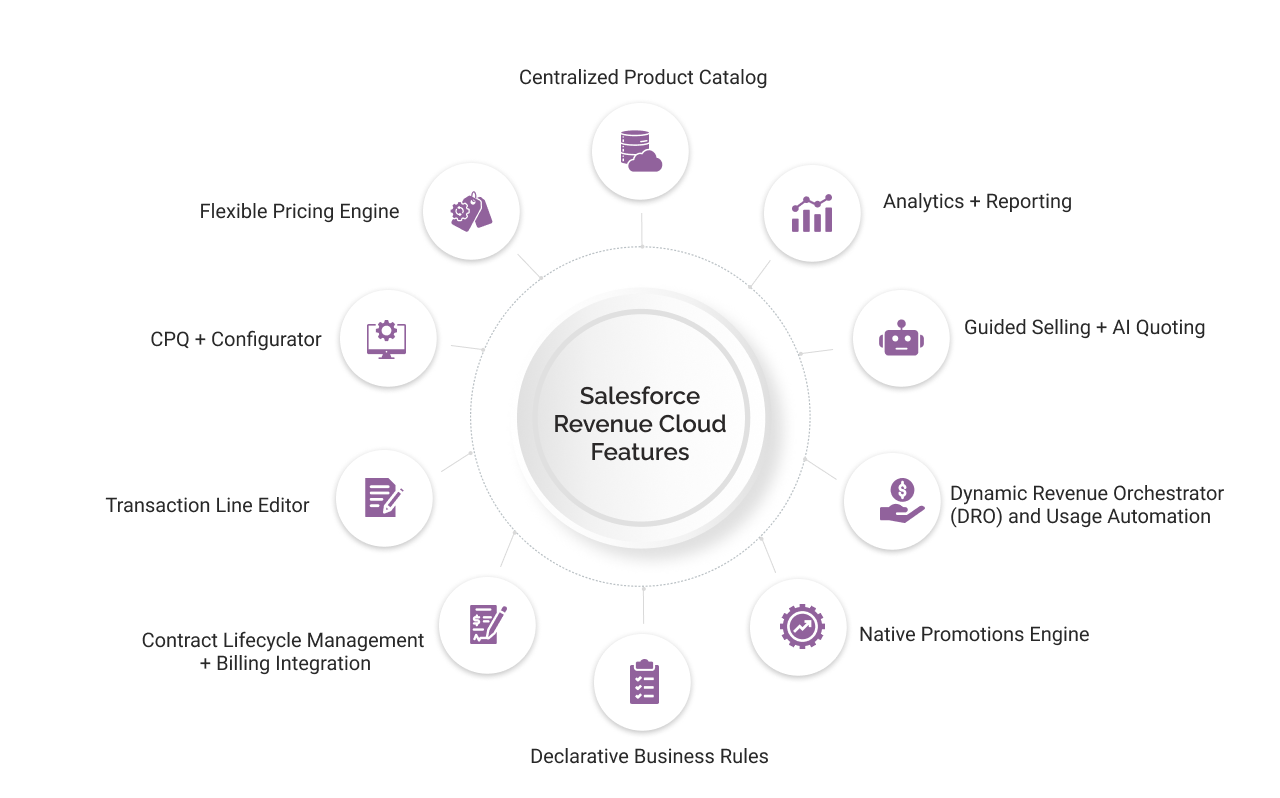
Salesforce Revenue Cloud represents an enterprise-grade architecture for organizations focused on unifying revenue processes, protecting margin, and delivering operational excellence at scale. The following are the core features:
1. Centralized Product Catalog
Revene Cloud’s product catalog is the core feature on which the platform is built. It replaces fragmented product records with a single, structured source of truth that is spread across geographies, channels, and business units. Every SKU, bundle, and attribute lives within this governed catalog, ensuring that quotes, orders, and contracts reflect approved configurations, no exceptions.
In practice, this eliminates the risk of outdated or conflicting product data creeping into deals, especially in organizations managing complex portfolios across markets. This feature is fundamental in building operational trust in the sales process.
2. Flexible Pricing Engine
The pricing engine enables businesses to govern pricing complexity without introducing unnecessary technical debt. Teams configure volume discounts, tiered pricing, subscription models, usage charges, and regional rules through declarative procedures. One good thing is you don’t have to juggle custom code or black-box logic.
The engine’s true strength lies in its balance of flexibility and control. It allows organizations to adapt pricing to market needs while keeping approval structures, margin thresholds, and policy enforcement intact. Starting in Spring ’26, pricing will have the ability to automatically update based on CPI or another market index to keep list prices in line without the need for manual repricing.
3. CPQ + Configurator
The CPQ engine and configurator ensure deal accuracy. Every quote passes through rules that check that product combinations and pricing structures adhere to business standards. The Constraint Builder adds another layer, making sure incompatible product choices are blocked right at the start rather than being caught later.
Enterprises that succeed with this platform do not treat this as a technical feature. They embed it as a key part of protecting their margins and keeping their sales process on track.
4. Transaction Line Editor
Large enterprise deals often have so many details that standard quoting tools can’t keep up. The transaction line editor addresses this directly, providing teams with a spreadsheet-style workspace inside Salesforce. It makes it easier to manage quotes and orders with hundreds of line items.
As of Summer ’26, the feature scales to fill the page rather than being placed in a fixed-height container. This means reps with multi-year deals can see dozens of lines, including a full ramp schedule, without scrolling in a tiny embedded box. The feature is especially useful for manufacturing, large-scale software, and telecom deals.
5. Contract Lifecycle Management + Billing Integration
Revenue Cloud connects contract management and billing together into one smooth flow. Approved quotes automatically create contracts that include renewal terms and any needed changes. Billing, whether for subscriptions, usage, or one-time fees, connects directly to these contracts.
Spring ‘26 updates for pricing-agreement contracts make amendments easier, along with performance improvements. This setup helps avoid data gaps between sales and finance, saves teams from time-consuming reconciliations, and gives finance teams instant visibility into contract-based revenue. It’s a core enabler of audit readiness and revenue recognition accuracy.
6. Declarative Business Rules
The business rules engine in the revenue cloud lets companies build price triggers, approval steps, discount controls, and deal safeguards right into the system, without code. Also, as business needs change, these rules can change with them.
This feature turns what could slow a deal down into something that helps the business move faster. It gives operations teams control without holding back growth.
7. Native Promotions Engine
One major addition in Spring ‘26 is a dedicated promotions console. It is where teams can create manual and automatic promotions as per category and product-level discounts. It uses a guided setup through a visual calendar that shows active and scheduled campaigns.
Initially, this logic required custom procedures for pricing, but now it is a declarative feature. It is important for most businesses running seasonal pricing, bundle incentives, or renewal-driven discounts.
8. Dynamic Revenue Orchestrator (DRO) and Usage Automation
DRO focuses on handling the asset transfer and organizes the order using custom scopes through location or time window. The fulfillment can be scheduled on custom dates and along with several billing safeguards, launched, including:
- Automatic Rate Card Capture locks the rate card entries when a quote or order is saved, so the catalog price changes don’t retroactively affect a quoted deal.
- Usage Product Validator analyzes the cross-object configuration on usage and rate objects before they go live and flags issues earlier.
- Daily Usage and overage monitoring provides representatives and customers visibility into consumption against limits across entire billing periods.
9. Guided Selling + AI Quoting
Revenue Cloud blends guided selling with AI to help sales teams create quotes that are both efficient and compliant. The quoting agent can even create full, approved quotes from natural language input, helping reduce manual mistakes and speeding up the sales process. These features reduce complexity for sales teams while preserving the integrity of pricing, product, and approval logic.
With Spring ’26’s promotions engine, one can check promotion eligibility automatically and add applicable discounts as part of the quote it drafts.
10. Analytics + Reporting
Revenue data is collected and brought together so teams can make smart decisions with clear dashboards and predictive analytics right inside the platform. Sales reps and managers can track bookings, renewals, revenue mix, and deal health at a glance. It helps sales leaders and decision-makers spot risks, find new opportunities, and keep the business working toward shared sales and finance goals.
This is where Revenue Cloud delivers its value: not in individual functions, but in how those functions combine to strengthen the entire revenue engine.
Salesforce Quoting Agent
The AI-powered Quoting Agent is one of the standout features in the Advanced edition. Built on Salesforce’s Agentforce framework, this tool works like a chat-based assistant right inside Salesforce.
Instead of clicking through forms, sales reps can simply type requests in plain language, for example: “Create a 12-month quote for [Opportunity] with product X and a 10% discount.” The agent takes care of the rest, generating a ready-to-review quote almost instantly.
How Quoting Agents Works?
Behind the scenes, the Quoting Agent pulls together data from both Revenue Cloud and Sales Cloud. It applies current product and pricing rules, checks for past deal history, and fills out quote details, including line items, discounts, and any approvals required. It can even draft the final quote as an email or PDF, ready for the customer.
As of Spring ‘26, the agent also focuses on promotion eligibility and suggests applicable promotions as part of the draft it builds. It does not commit to anything autonomously, and drafts are reviewed by a representative before sending.
This level of automation helps speed up sales cycles significantly. Sales teams spend less time on admin and more time focusing on customers. The conversational interface is designed with the Einstein Trust Layer for security, and companies can customize it using the Agent Builder tool so it reflects their own pricing rules and policies.
How Businesses Can Leverage Revenue Cloud in Their Operations
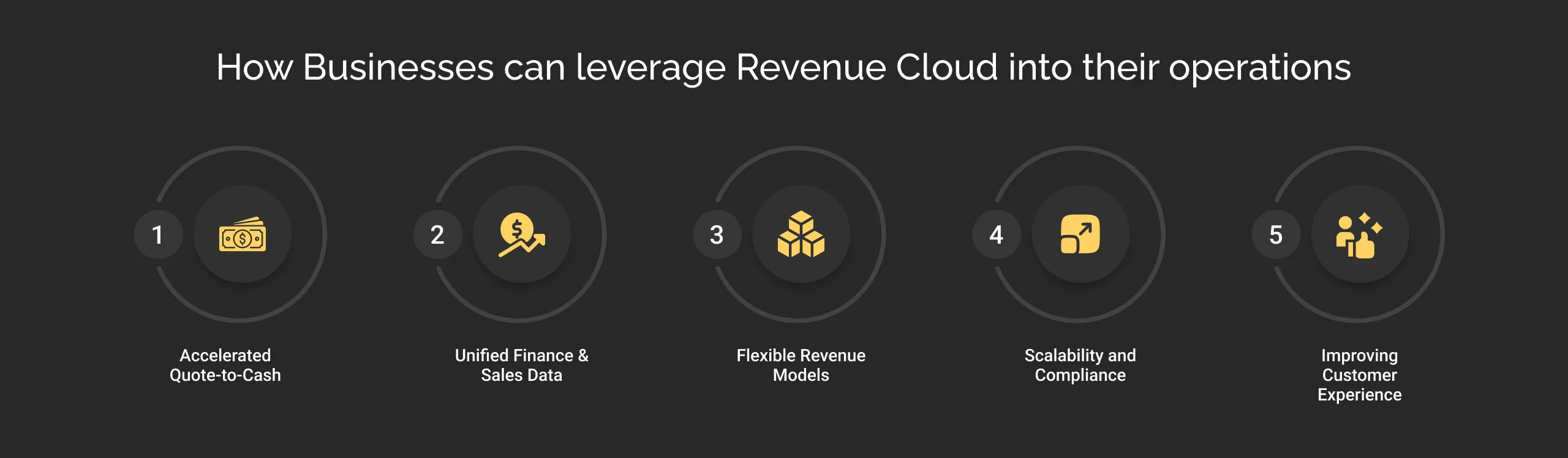
Sales, finance, and RevOps teams turn to Salesforce Revenue Cloud to transform how deals are managed, from the first quote to final payment. But most businesses end up tapping into only a fraction of what it can truly deliver.
Let’s break down not just the well-known strengths, but also the lesser-discussed, high-impact strategies that can help you utilize Revenue Cloud’s full potential.
1. Accelerated Quote-to-Cash
Salesforce Revenue Cloud platform is designed to help organizations close deals faster. By automating processes like quoting, approvals, contracts, and billing, it helps teams free up time from repetitive work.
The AI-powered Quoting Agent can be leveraged to generate complex quotes in seconds using natural language, allowing sales reps to focus on meaningful customer conversation rather than spending hours/days building quotes. Approval workflows ensure pricing deviations are flagged instantly.
According to Salesforce, using these tools can reduce quote assembly time dramatically, and representatives experience up to 87% fewer clicks and go from hours to minutes per quote.
To truly leverage it, make Revenue Cloud your dynamic pricing lab
- Simulate, don’t just automate: Use the Revenue Management platform to test different pricing models- tiered, usage-based, hybrid-inside sandboxes before rolling them out to customers.
- Link to analytics: Connect simulated quotes to Tableau or CRM Analytics to see how pricing models could impact margins, revenue mix, or deal performance.
- Collaborate across teams: Bring finance and product teams into the process so pricing experiments feed your go-to-market strategy instead of staying theoretical.
Expert insight: When you approach Revenue Cloud as a pricing experimentation hub, you give your team a powerful advantage in adapting to market changes.
2. Unified Finance & Sales Data
The platform brings all revenue events together, including new orders, renewals, expansion, and usage charges, inside Salesforce. This eliminates the need for spreadsheets or disconnected systems. Contracts, orders, and invoices all live in one place.
Finance teams recognize revenue on time, CFOs gain real-time visibility into the pipeline, and the entire organization benefits from faster closes and improved margins.
To truly leverage it, drive proactive finance operations
- Use Revenue Events as live triggers: Set them to run finance workflows automatically, like creating accrual tasks when usage spikes.
- Build auto-reconciliation flows: Compare contract terms to invoice lines in real time and flag discrepancies before they create month-end headaches.
- Integrate with ERP systems: Ensure seamless syncing of quotes, invoices, payments, and revenue recognition entries to eliminate gaps between systems.
With smart setup, Revenue management doesn’t just report on finance ops but helps run them live.
3. Flexible Revenue Models
The platform supports just about any pricing model, including one-time sales, subscriptions, usage-based billing, or hybrids. This flexibility lets companies pivot or expand their business models without needing to rework systems. Pricing rules and bundles are programmable. This enables sales reps to upsell, cross-sell, or modify deals easily, all tracked in one place.
To truly leverage it, make it your pricing risk manager and innovation hub
- Custom price procedures: Set up customer-specific pricing logic so representatives don’t have to handle deals which the system does for them.
- Add risk scoring: Fields like discount risk or deal complexity index can feed dynamic approvals and AI prompts that guide reps in real time.
- Simulate hybrid models: Use Revenue Cloud’s configurability to test complex deal structures, like fixed + usage + milestone, before they hit the market.
Revenue cloud can help you manage pricing complexity alongside flagging risks early and supporting innovation without operational chaos.
4. Scalability and Compliance
The platform was built to scale. It can handle millions of transactions per day and manage billions in billing revenue. It is designed with auditability and security built in through Einstein Trust Layer and compliance controls.
To truly leverage it, turn Revenue Cloud into a compliance regulator
- Build compliance directly into flows: Use Flow Orchestrator or OmniStudio to store tax validations, discount caps, and mandatory contract clauses.
- Auto-standardize contracts: Ensure region-specific legal language is added at the quote stage, not as an afterthought.
- Generate audit-ready reports: Create reports that show the full lineage from quote to contract to invoice, ready for finance or external audit teams.
Revenue Cloud platform can help your company pass audits cleanly and confidently, provided compliance is embedded in your process, not added at the end
5. Improving Customer Experience
Faster quoting and clean renewals mean customers get what they need quicker and with fewer errors. Many organizations also build self-service portals using OmniStudio, allowing customers to manage subscriptions, payments, or plan changes themselves, all of which boosts satisfaction and retention.
To truly leverage it, make self-service part of your retention strategy
- Create interactive, dynamic portals: Go beyond static dashboards and let customers simulate upgrades, request custom quotes, or handle invoicing on their own.
- Trigger proactive outreach: Tie portal actions (like a downgrade request) to auto-tasks for CSMs, so they can step in at the right moment.
Revenue Cloud is so much more than CPQ + billing + automation. When configured and connected thoughtfully, it becomes a dynamic pricing and revenue lab, a live risk and compliance manager, and a proactive finance and retention driver.
How Revenue Cloud Works?
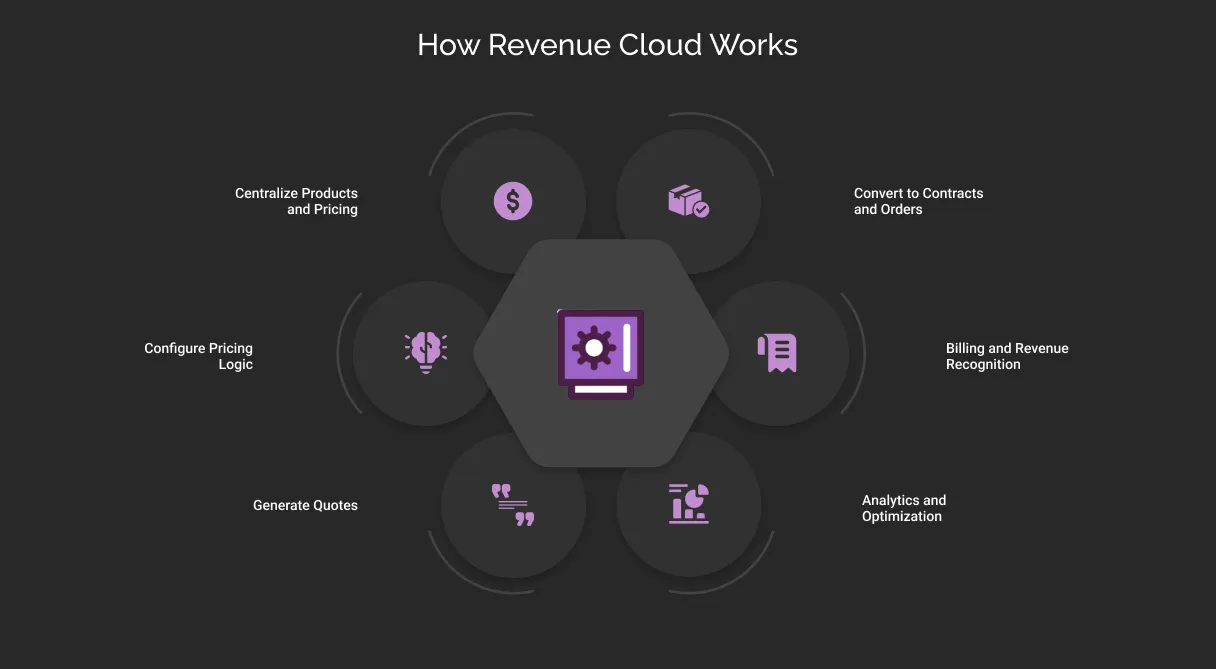
Implementing Revenue Cloud generally follows a quote-to-cash workflow:
1. Centralize Products and Pricing:
Load all products, bundles, and pricing rules into Revenue Cloud’s product catalog. This ensures consistency; for example, Salesforce advises storing “product details and pricing rules” in Revenue Cloud so the quoting engine can reference them.
2. Configure Pricing Logic:
Define pricing procedures and discounting rules (e.g. tiered pricing, customer-specific rates) in the system. These rules are applied automatically during quoting and won’t get lost in spreadsheets.
3. Generate Quotes:
Sales reps use the RCA CPQ interface or the AI Quoting Agent to build quotes. In the UI, reps select products, and the system applies pricing rules in real-time. Alternatively, reps can simply ask the Quoting Agent “Create a 12-month business quote with product X” – within seconds the agent “pulls real-time data (products, pricing rules, discounts, and deal history)” to generate a complete quote. The agent can also handle approvals (e.g. large discounts) and even email the finalized quote PDF to the customer.
4. Convert to Contracts and Orders:
Once a quote is accepted, it becomes a Salesforce Contract (if needed) and an Order. Revenue Cloud automatically captures all details (line items, pricing, terms). Finance can then see these orders in Salesforce or push them to an ERP.
5. Billing and Revenue Recognition:
The order lines drive invoice generation and revenue schedules. (For example, a multi-year contract can produce monthly invoices.) Usage-based events (if any) are metered and processed. Salesforce Billing or partner solutions generate invoices and record payments. If integrated with an ERP, the relevant invoices or revenue entries flow out to the accounting system.
6. Analytics and Optimization:
All revenue data, from quote stage to payment, lives in one place. Stakeholders use dashboards and reports to analyze pipeline, churn, pricing effectiveness, etc. For instance, RevOps can track which products generate the most recurring revenue, and finance can forecast monthly revenue using updated subscription data.
Throughout this process, automation and rules play a big role. Built-in workflows route approvals (e.g., for big discounts), and any custom business logic (e.g., approval chains, discount gates) can be configured declaratively. AI features like Agentforce handle the conversational quoting steps. The end result is a streamlined, audit‑ready revenue pipeline with minimal manual handoffs.
Salesforce CPQ vs. Salesforce Revenue Cloud
Many businesses are used to Salesforce CPQ, but it’s important to see how (Revenue Cloud) takes things further.
Here is the detailed breakdown of what makes Revenue Cloud different from CPQ:
| Aspect | Salesforce CPQ | Salesforce Revenue Cloud (Agentforce Revenue Management) |
|---|---|---|
| Status | End of sale from March 19, 2025. There are no new licenses or features. | Newly created; all Salesforce focus goes here. |
| Platform Architecture | Managed package installed on top of Salesforce. | Built natively on Salesforce’s core platform. Leverages Lightning Flows, OmniStudio, and modern APIs. |
| Upgrade & Maintenance | Updates require managed package upgrades. UI and feature enhancements are slower to adopt Salesforce platform innovations. | Follows Salesforce’s standard release cycles, making upgrades and UI enhancements smoother and faster. |
| Core Features | Quoting, product configuration, bundling, pricing rules, discounting, approvals. | Includes all CPQ features plus centralized product catalog, reusable pricing procedures, transaction UI, and guided selling. |
| Billing & Invoicing | No native billing or invoicing; requires separate integrations or add-ons. | Billing SKU adds native invoicing, subscription management, usage-based billing, and revenue operations. |
| ERP Integration | Basic ERP integration is possible but limited in native support. | Deeper ERP integration support as part of a unified architecture. |
| Scalability & Flexibility | More rigid due to managed package structure. | API-first, modular, and extensible — better suited for complex revenue models and scalable operations. |
| Future Development | No new sales of CPQ licenses. Existing customers supported but no major new feature development planned. | All future innovation and feature development focused on the RCA and Revenue Cloud platform. |
| User Experience | Older UI patterns; limited alignment with the latest Salesforce UI and UX tools. | Modern UI aligned with Salesforce Lightning standards and enhanced usability features. |
| Analytics & Contracts | Basic reporting through Salesforce reporting tools; contracts handled separately or via add-ons. | Integrated analytics, contracts, and revenue operations within the same platform. |
Consider Revenue Cloud as the next-generation CPQ. It retains the familiar quoting, bundling, and approval capabilities of Salesforce CPQ, but as part of a unified platform that includes contracts, billing, and analytics all together. The move to RCA means companies get a more flexible, scalable system for revenue operations.
Salesforce Agentforce Revenue Management (Revenue Cloud) Pricing
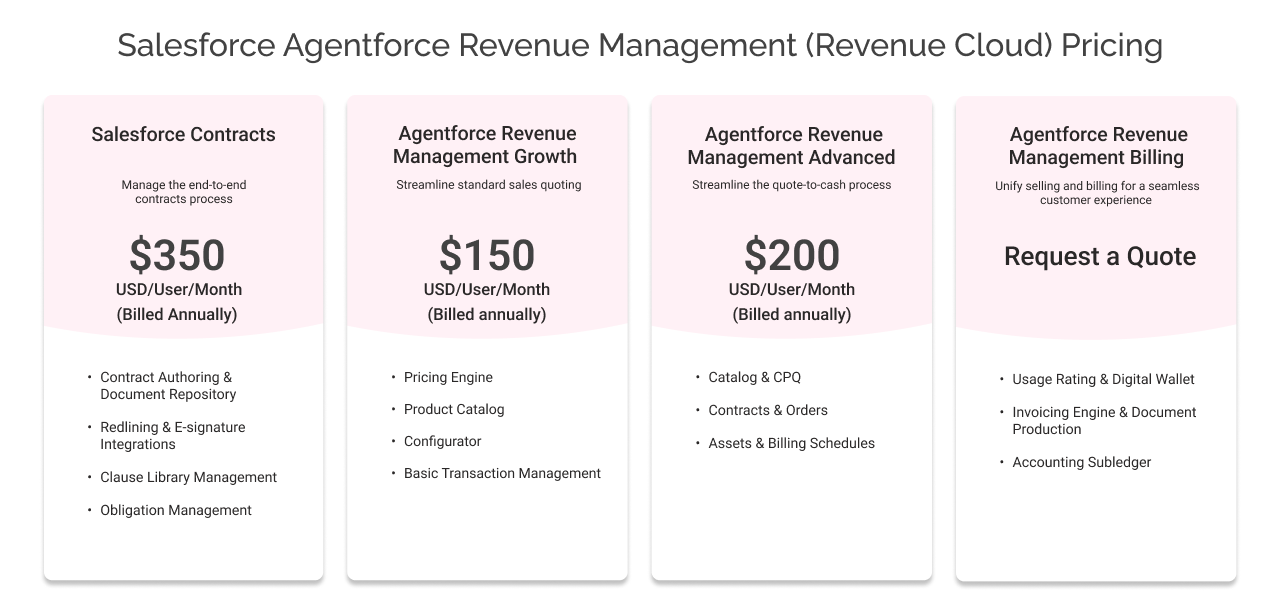
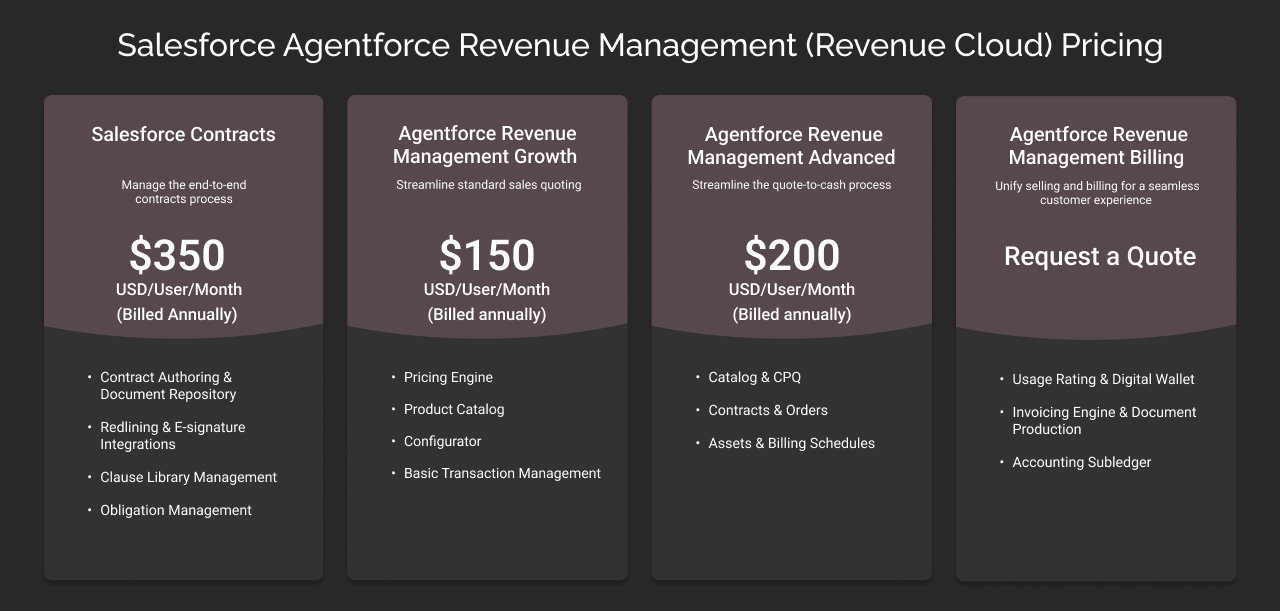
Revenue Cloud offers a cohesive solution for managing your entire sales-to-cash workflow. Here is the detailed pricing:
- Agentforce Revenue Management Growth – $150/user/month (billed annually)
The entry package includes the pricing engine, product catalog, configurator, and basic transaction management. It is perfect for standard sales teams who do not need contract lifecycle management. Order orchestration, or Agentforce AI.
- Agentforce Revenue Management Advanced — $200/user/month (billed annually)
This package is built for teams that handle complex quote-to-cash cycles on a regular basis. It combines everything from product catalog setup and CPQ tools to contract management, order tracking, asset management, and billing schedules. If your team is managing quoting through to order fulfillment, this edition gives you the tools to do it all in one system.
- Salesforce Contracts — $50/user/month (billed annually)
This option focuses entirely on contract lifecycle management. It includes features like contract authoring, clause library management, e-signature support, redlining, and obligation tracking. It’s a good fit for teams that want to streamline contract workflows without needing the full quote-to-cash toolkit.
- Agentforce Revenue Management Billing (Add-On)
If your business needs advanced billing features such as usage-based invoicing, accounting subledgers, or digital wallet support, this add-on can be layered onto either the Advanced or Contracts edition. Pricing for the billing add-on is customized, so it’s best to discuss specifics with Salesforce based on your requirements. For teams managing recurring revenue or complex billing models, this is worth adding to your plans.
Beyond the per-user fees, it’s important to plan for Salesforce implementation costs as well. These can vary widely depending on how complex your setup is. Many organizations work with Salesforce implementation partners to help with configuration, integrations, data migration, and rollout to ensure everything is aligned with their business processes.
To Conclude
Salesforce Revenue Cloud, renamed as Agentforce Revenue Management, is a platform that offers businesses the foundation to unify and scale their revenue operations, but its true value comes from how it’s shaped to fit your strategy, not just your systems.
On its own, technology doesn’t create advantages. What creates advantage is how that technology is applied to protect margin, introduce new revenue models, strengthen compliance, and enable teams to make smarter decisions faster.
That’s where we, at Cyntexa, come in. We help businesses turn Revenue Cloud into a growth engine aligning processes with goals, integrating across platforms, and building revenue flows that support resilience, agility, and smarter decisions at every step.
Every company can license Revenue Cloud. The difference is in how you turn it into a growth engine that fits your vision and scales on your terms.
Get started before your competitors learn the secret art of managing revenue better than you.
Don’t Worry, We Got You Covered!
Get The Expert curated eGuide straight to your inbox and get going with the Salesforce Excellence.
Tanushri heads Growth and Strategy at Cyntexa, with over 6 years of experience in sales and marketing. She specializes in aligning go-to-market teams, scaling revenue operations, and building structured, tech-enabled growth plans. Tanushri also advises businesses on Salesforce, ServiceNow, AWS and Google Cloud adoption, ensuring each strategy is execution-ready, future-proof, and tailored to the organization’s maturity and growth goals.


Cyntexa.
Join Our Newsletter. Get Your Daily Dose Of Search Know-How
Frequently Asked Questions
Salesforce Revenue Cloud is an integrated solution that connects your entire revenue lifecycle, from product configuration and quoting to contracts, billing, and revenue recognition. It unifies sales, finance, and operations on a single platform, helping businesses automate complex processes like pricing, discounting, invoicing, and renewals.Revenue Cloud goes beyond traditional CPQ (Configure, Price, Quote) tools by embedding billing, subscription management, and compliance controls, all within the Salesforce ecosystem. This enables organizations to manage quote-to-cash processes seamlessly, with greater accuracy and transparency.
Yes, Revenue Cloud integrates natively with other Salesforce clouds, including Sales Cloud, Service Cloud, Marketing Cloud, Commerce Cloud, and industry-specific solutions like Health Cloud or Financial Services Cloud.Beyond Salesforce, Revenue Cloud connects with ERP systems, tax engines, payment gateways, and third-party accounting platforms through APIs, MuleSoft, and pre-built connectors. This flexibility ensures businesses can align their revenue operations with broader enterprise systems without duplication or manual workarounds.
Revenue Cloud is designed for flexibility, making it suitable for a wide range of industries, from SaaS, manufacturing, telecom, and healthcare to financial services, media, and subscription businesses. What makes it industry-agnostic is its ability to support varied revenue models (one-time sales, subscriptions, usage-based, hybrid) and adapt to sector-specific compliance or billing needs. That said, its value is highest in businesses managing complex pricing structures, contract lifecycles, or recurring revenue streams.
The cost of implementing Salesforce Revenue Cloud varies based on several factors: Licensing: Revenue Cloud is sold as an add-on to Sales Cloud, Service Cloud, or industry-specific Salesforce solutions. Scope: Complexity of your pricing models, billing requirements, number of users, and integration points all influence the price. Implementation services: Partner-led implementations typically involve costs for design, configuration, integration, data migration, and training.As a rough benchmark, licensing may start around $150–$200 per user per month, while Salesforce implementation services depend on scale and complexity. Engaging a trusted Salesforce partner helps optimize both cost and time-to-value.