





ServiceNow Build Agent: Everything You Need to Know for the ServiceNow IDE
source on Google

Table of Contents
source on Google
Building a ServiceNow app used to mean weeks of development work. Now it takes a conversation with the Build Agent. From writing code and organizing files to fixing errors, the ServiceNow Build Agent handles all aspects of application development, all within a conversational interface layered on top of the ServiceNow IDE.
Simply put, ServiceNow Build Agent is an AI tool that helps developers and non-technical users create, build, and deploy a scoped ServiceNow application and workflows using natural language prompts.
This is just a brief of what the ServiceNow Build Agent is and what it can do. Its capabilities are far beyond this. This blog will help you learn about this in detail.
What is the ServiceNow Build Agent?
Build Agent is an autonomous AI agent that designs and develops production-ready ServiceNow applications from scratch. It uses vibe coding, which is an AI-driven method allowing developers and non-developers to provide natural language prompts to create apps.
The build agent is powered by Anthropic models at its core, which gives it enough context to understand the full scope of an app from a single prompt. Accordingly, it autonomously sets up the application database, applies business rules, runs diagnostics, debugs, and launches a full-fledged ServiceNow native application.
Key Features of the AI Build Agent
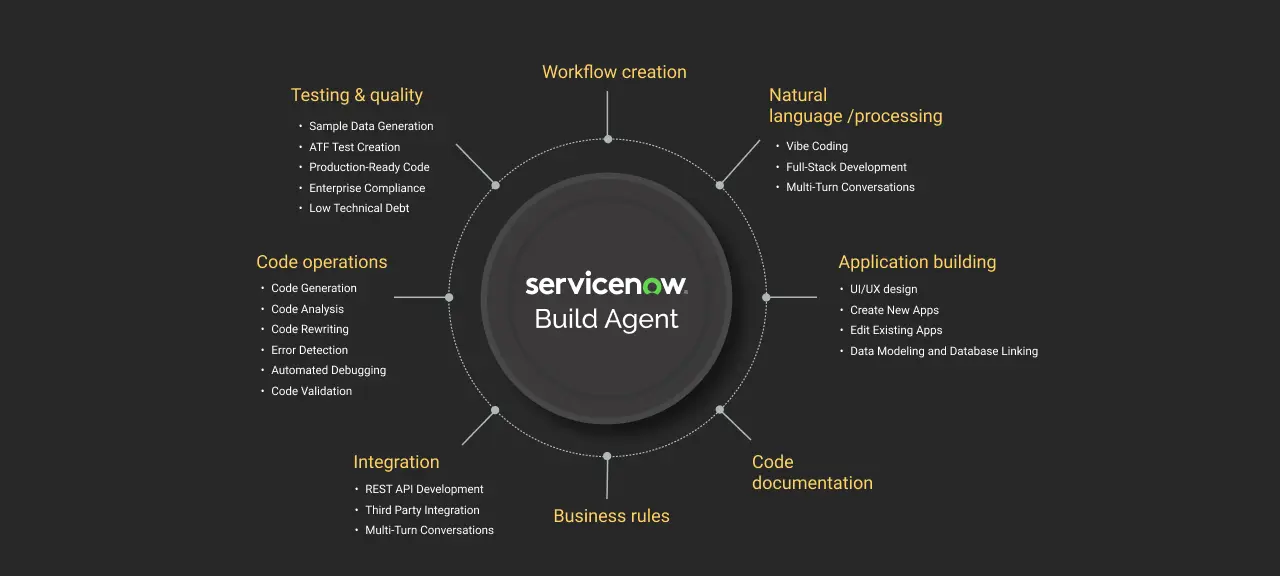
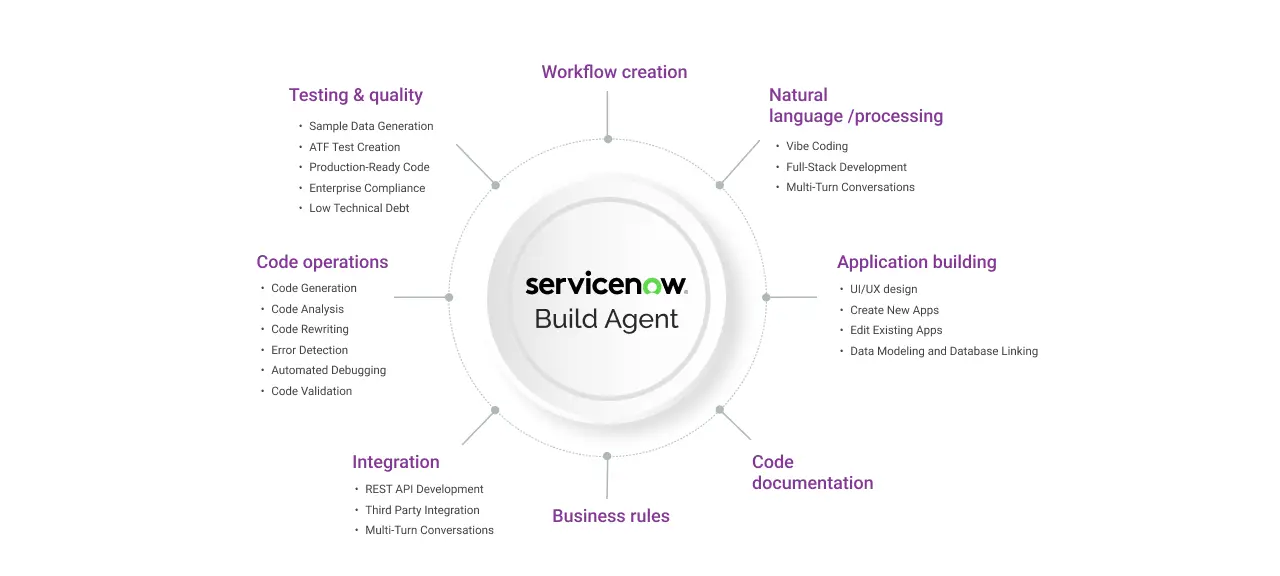
ServiceNow build agent supports a multitude of features like app creation, UI designing, database/backend support, third-party integrations like payment gateways, external APIs, automated testing, and advanced features like self-correction loops, SLA configuration, role management, and much more.
So, let’s look into the features of build agents that transform the app development process, allowing week-long coding to be completed in just minutes of conversation.
01. Conversational app building: Full-stack application development
Build Agent adds a conversational chat layer directly on top of the ServiceNow IDE. The core skills of Build Agent can be accessed on Cursor, Windsurf, Claude Code, and GitHub Copilot, available through the ServiceNow SDK. Every app you build still runs and governs on the ServiceNow AI Platform.
From backend database architecture to front-end user interface, Build Agent handles everything. It can autonomously create workflows, install necessary libraries, and include packages and dependencies required for app development. In addition, it can create tables, columns, apply business rules, update access control lists, define user roles, and design UI pages, all through conversational app building.
02. Production-ready code via the Fluent framework
All code generated by Build Agent uses the Fluent Framework, a TypeScript-based development framework built specifically for modern ServiceNow application architecture.
Fluent offers compile-time error checking, which means bugs are caught before deployment rather than in production. It also enforces a clean code structure that supports long-term maintainability, making it easier for developers to refactor, test, and extend the application over time.
03. Vibe coding
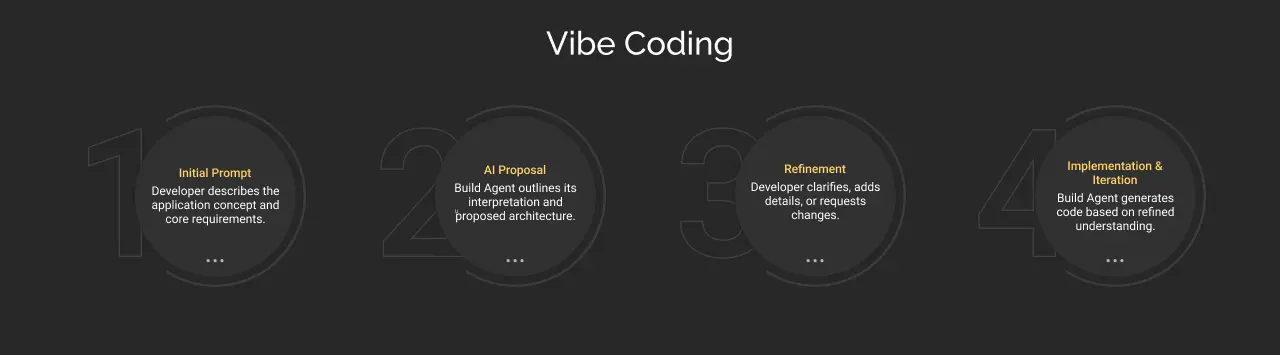
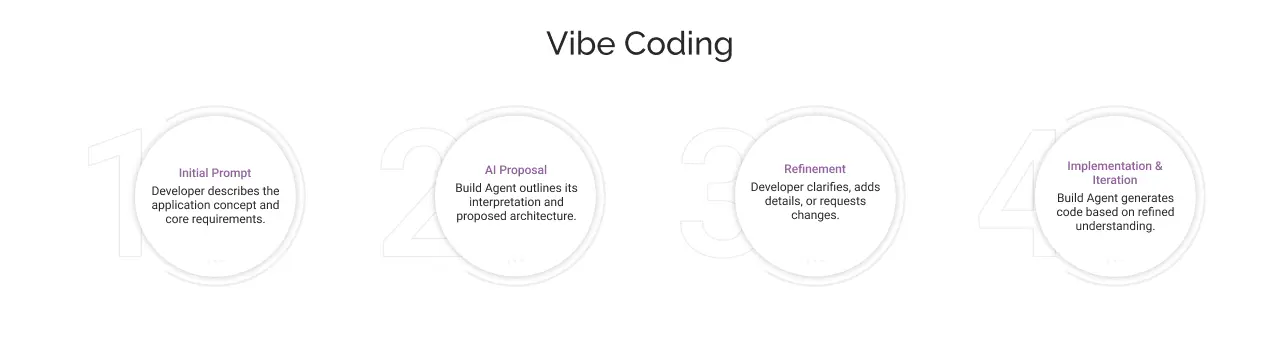
ServiceNow supports Vibe coding, which eliminates the traditional ‘write-compile-debug’ cycle. Meaning, it is a new age development paradigm that leads to an automated app development process from creation, optimization, to deployment using conversational language.
Instead of specifying “how” to build functionality (loops, conditions, and data structures), developers specify “what” they want to achieve (business outcomes, user experiences, workflows). The build agent interprets the app requirements and accordingly accelerates app development while eliminating technical knowledge barriers.
04. Self-healing code
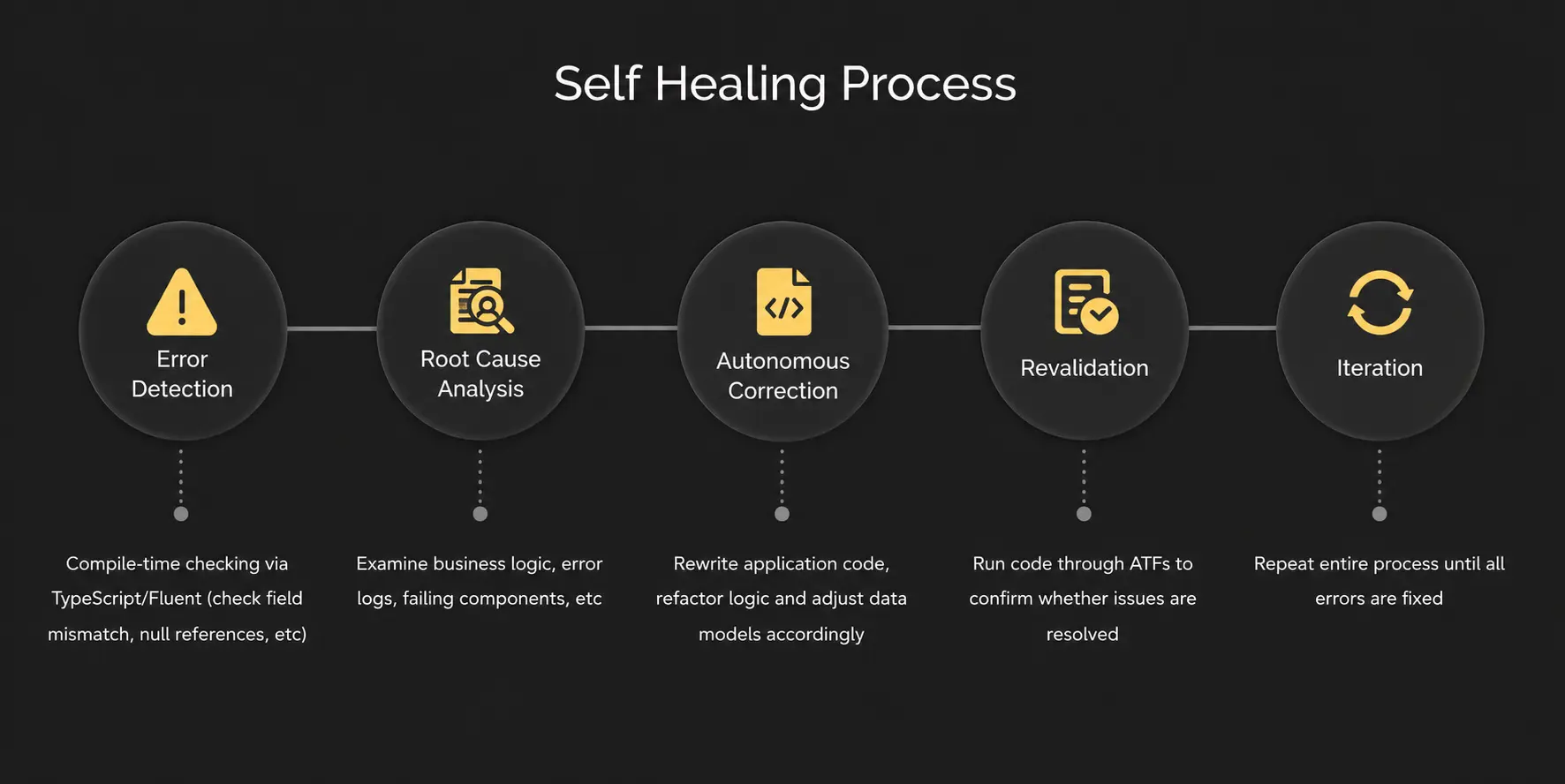
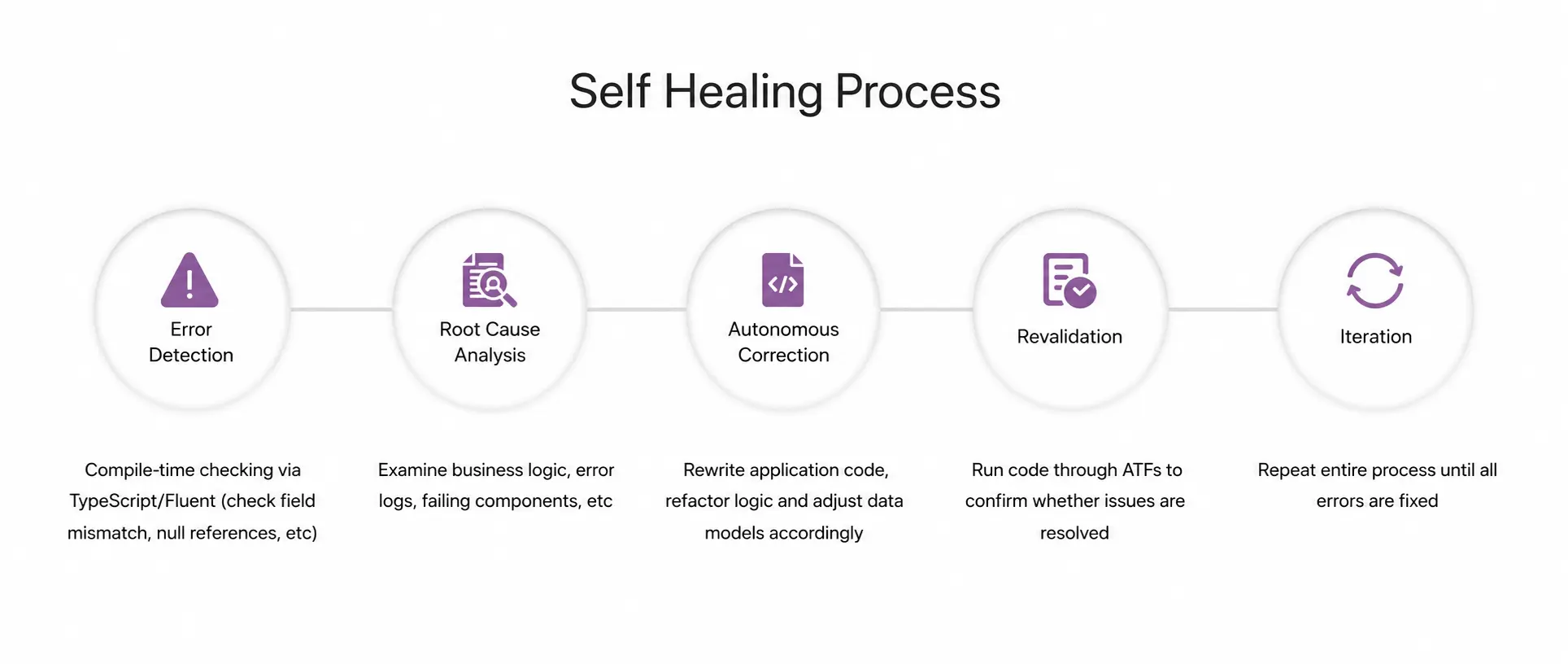
Build agent generates application code and immediately runs it through Automated Test Frameworks (ATFs), enabling debugging and error-checking, which leads to self-healing. It simply means that if something breaks, ServiceNow Build Agent finds the cause, fixes it, and retests.
The self-healing process occurs in stages, starting from runtime error detection, root cause analysis, autonomous error correction, revalidation, and iteration until all test cases are successful. Hence, you don’t have to manually debug anything.
05. Work on any app
Most enterprises are not building new apps; they are transforming the existing ones. With Build Agent, you can modify a standard ServiceNow workflow, extend an existing application, or add a feature to an app that’s already in production. It works across custom apps and out-of-the-box ServiceNow applications.
06. Human in the loop
The build agent can perform actions autonomously, from app description to deployment. But it shows what it’s about to do and seeks permissions from humans at every major step.
Through this, the Build Agent maintains transparency in the app development process, showing the underlying scripts, file creation, data loading, data refinement, version control, testing, and deployment to developers.
07. Connect the tools your team already uses
Build Agent connects your apps to the tools your business runs on, including Git repositories, payment gateways, and platforms like Salesforce and Jira through pre-built connectors. REST and SOAP APIs help in communication with external systems.
At Knowledge 2026, Build Agent also became an MCP Client. It means that Build Agent can now pull live context directly into the build session, like design specifications from Figma, requirements from Miro, code context from GitHub, etc.
How ServiceNow Build Agent work?
The build agent platform adds a conversational layer on top of ServiceNow IDE, allowing developers and even non-coders to design and deploy full-scale ServiceNow apps using natural language.
Let’s see how –
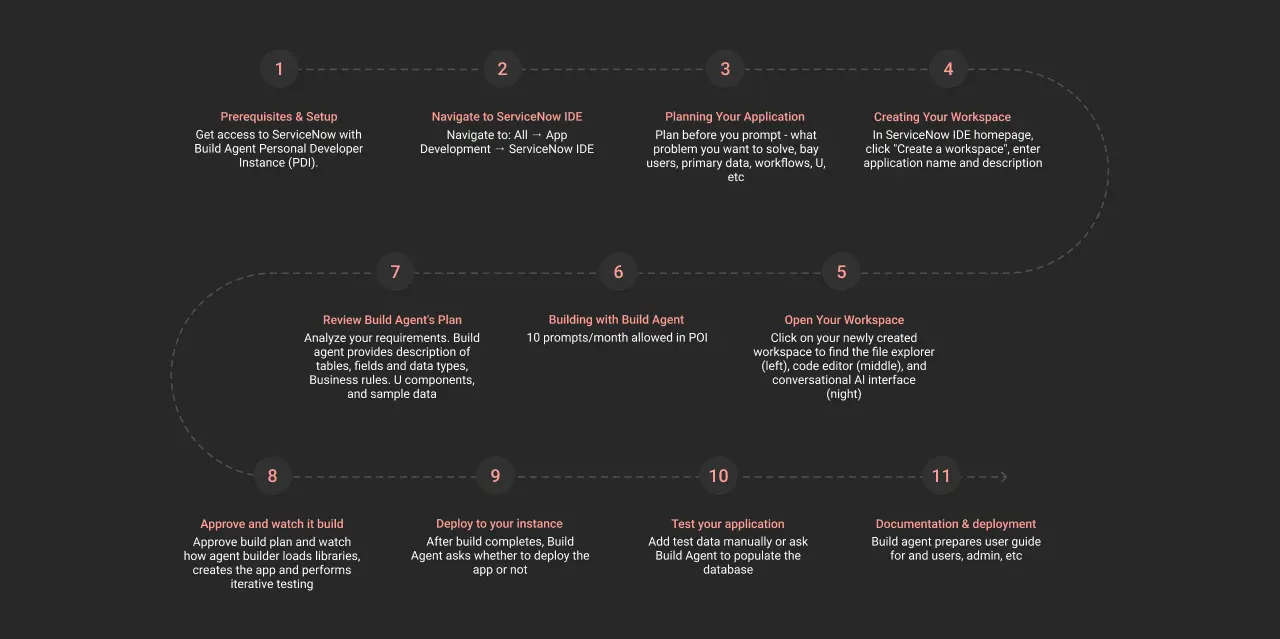
Stage 1: Set up and prerequisites
- Access Build Agent through a Personal Developer Instance at developer.servicenow.com, or activate it directly on your existing ServiceNow instance.
- Next, log in to your ServiceNow instance by navigating to All → App Development → ServiceNow IDE.
Stage 2: Application planning and workspace creation
- Go to the ServiceNow IDE homepage and click on “create a workspace”.
- After workspace creation, provide a name to your application along with its description.
- Open the newly created workspace to find files in the left panel, code editor in the middle, and conversational chat interface (AI assistant) on the right side of the workspace.
Stage 3: Build app with build agent
- Write your first prompt in the chat interface. Include the app’s goal, scope, functionality, target users, and data requirements.
- Build Agent generates a build plan including tables, fields, UI components, business rules, and sample data. Review it, suggest changes if needed, and approve.
Stage 4: Approve and build the app
- Build Agent starts generating code using the Fluent Framework
- Track file creation, real-time updates, progress indicator, and summary of app completion.
Stage 5: Automated debugging and testing
- After creating the app architecture and finishing the app design, the build agent performs automated debugging to resolve errors at run time.
- After new changes are made, developers can perform manual testing or seek assistance from the build agent.
Stage 6: Documentation and deployment
- Once testing is complete, Build Agent bundles the application and asks for your approval before deploying.
- After approval, Build Agent deploys the app to your ServiceNow instance and generates complete documentation, including a user manual, an admin setup guide, a technical architecture doc, and API documentation.
Who can benefit from ServiceNow Build Agent?
ServiceNow Build Agent is transforming enterprise app development across various skill levels and organization sizes. The platform holds no coding barrier that enables coders (also, non-coders) to build apps quickly with IT oversight, guardrails, and governance.
This has led citizens, professional developers, small to large-scale enterprises, ServiceNow consultants, and partners to quickly leverage the build agent for automated app development. Here’s how each one of them benefits from Build Agent –
1. Citizen developers and business analysts
Platform administrators, business analysts, and citizen developers fully understand the business problem but depend on a developer to build the solution. Build Agent closes this gap by providing AI-native tools, making it easy to build.
2. Professional developers
All developers, irrespective of their skill levels, can use natural language prompts to build full-stack applications using ServiceNow Build Agent.
3. Low-code builders and ServiceNow admins
With Build Agent, low-code builders and ServiceNow admins get an agentic assistant that can plan, generate metadata, build applications, and package them for deployment.
4. Developers using external IDEs
As announced in May 2026, ServiceNow SDK and new Build Agent skills work across every major AI development environment. So now, developers can stay in their preferred IDEs to create applications from scratch.
5. ServiceNow partners and ISVs
ServiceNow’s Build Program is redesigned for partners and ISVs to brainstorm new ideas and bring them to market in a comparatively faster build time.


Wrapping up
Build Agent automates app creation. Non-technical teams that always depended on developers can now build independently. But building and launching ServiceNow apps requires more than technology. It demands strategic implementation. Knowing which apps to build first, how to structure them for scale, and how to govern them from day one is the most important aspect.
As a ServiceNow implementation partner, Cyntexa’s developers have hands-on experience working on autonomous ServiceNow applications, which will help you strategically design and launch a production-ready app. So, book a consultation with our experts to accelerate your ServiceNow ROI from day one!
Don’t Worry, We Got You Covered!
Get The Expert curated eGuide straight to your inbox and get going with the Salesforce Excellence.
Shruti is a ServiceNow Consultant with 5+ years of experience across ServiceNow ITSM, AWS, Salesforce Loyalty Management, and managed services. She blends technical expertise with strategic insights to deliver transformative IT services and CRM solutions that enhance efficiency and customer satisfaction.


Cyntexa.
Join Our Newsletter. Get Your Daily Dose Of Search Know-How