


What is Databricks? Complete Guide to the Data + AI Platform
source on Google

Table of Contents
source on Google
Databricks is the Data + AI platform where businesses bring all their data, in whatever form it is in, and use it for reporting, analysis, and building AI, so all teams can work from the same governed data foundation.
For example, most businesses store data in one place, run reports from another, and build AI somewhere else entirely, so teams end up doing the same work three times with three different versions of the truth. Databricks eliminates this with a unified platform.
What does Databricks do, and why do businesses use it?
Businesses run into the same handful of problems once they start working with a large amount of data. Data lives in different systems, so nobody gets one complete picture. A report built for the finance team uses one version of the numbers, while a model built for the product team uses another, and neither team is sure which one is right.
Processing large volumes of data becomes slow and expensive as it grows, especially once a business wants real-time data. And with data spread across tools, it becomes difficult to know who has access to what, or to trust that sensitive information is actually protected.
Databricks closes this gap, giving businesses one place to store data of any type, so teams stop maintaining separate copies for different purposes. It processes that data at scale, fast enough to support both scheduled reporting and real-time use cases. It applies one set of rules for who can access what, so governance does not depend on which tool someone is using that day.
And because reporting, analysis, and AI all draw from the same governed data, the numbers a business acts on stay consistent, whether they show up in a dashboard, a model, or an AI agent’s response.
Who uses Databricks?
More than 60% of the Fortune 500, including Siemens, Toyota, Warner Bros. Discovery, and Heineken, use Databricks.
Also, anyone who works with business data may use Databricks, but each team uses it for specific purposes.

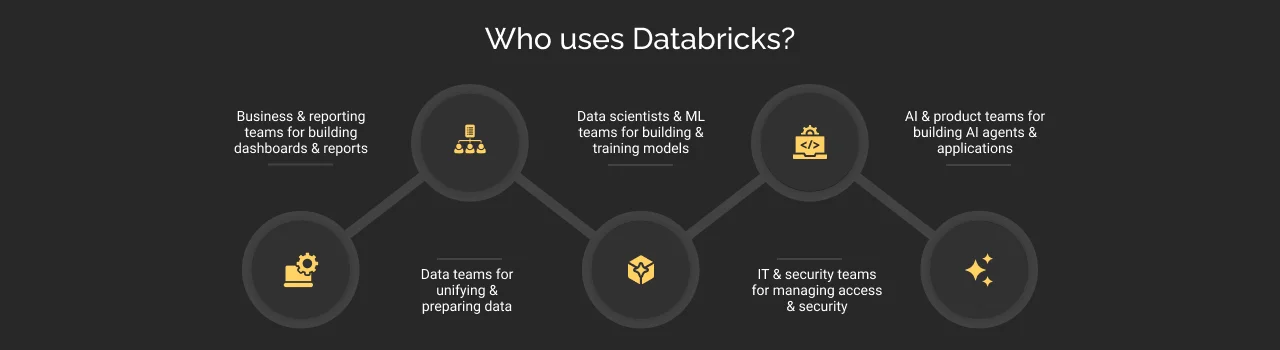
- Business and reporting teams: Build dashboards and reports using the same trusted data instead of relying on separate spreadsheets.
- Data teams: Bring data together from different systems and prepare it for the rest of the organization, so teams don’t have to start from scratch.
- Data scientists and ML teams: Build and train models directly on governed data, without exporting or moving it to another platform.
- IT and security teams: Manage access, protect sensitive information, and apply security controls from one place.
- AI and product teams: Build AI agents and applications that reason over the business’s own data, governed by the same access rules as everything else.
In short, different teams, one platform, and one source of trusted data. That’s the shift Databricks is built around.
Where is Databricks used?
Databricks is not limited to one department or one type of workload. Businesses can use it in different areas where data needs to be processed and analyzed into insights and AI applications.
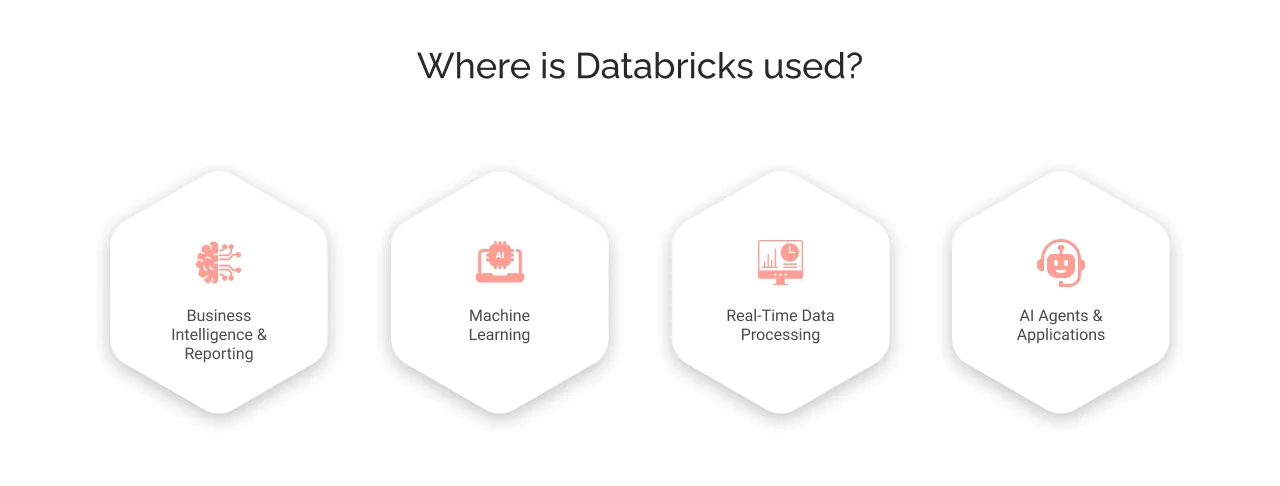

Business intelligence and reporting
Databricks is used in creating dashboards, sales reports, financial summaries, and operational metrics.
For business intelligence, teams can use the same governed data that supports other analytics and AI workloads with Databricks. They do not have to maintain separate data copies for the report for business functions.
For example, a retail company can build a dashboard that tracks sales across stores in different regions using data from its Lakehouse. The same underlying data can also support inventory analysis and financial reporting, giving different teams a more consistent view of business performance.
Machine learning
Databricks enables businesses to build machine learning models. It helps businesses predict what may happen next. The common examples include detecting potential fraud transactions, predicting customer churn, forecasting demand, and identifying unusual patterns in business data.
As Databricks brings data engineering, data science, and machine learning capabilities together, it allows teams to prepare data, develop ML models, train them, and manage their ML workflows within the same platform. This reduces the need to move data between disconnected environments and makes it easier to connect ML workflows with the data used across the business.
For example, a banking organization can use transaction data to develop and train a fraud detection model that identifies patterns associated with potential fraud activity.
Real-time data processing
Website activity, application events, sensor readings, transactions, and system logs generate large amounts of data that businesses need to process quickly. Databricks supports streaming and real-time data processing that enables businesses to process data continuously and build analytics that respond to events as they occur.
For example, a logistics company processes vehicle location and shipment data to monitor deliveries, identify delays, and provide teams with more timely information about the movement of goods.
Databricks also supports application workloads that need to read and write data in real time through Lakebase, a fully managed database for transactional use cases such as checkout processes, account updates, and live order status. This brings application data closer to the same platform used for analytics and AI, reducing the need to maintain seperate data environments.
AI agents and applications
Databricks is used to build AI applications and AI agents that can work with an organization’s own data. Rather than relying only on general-purpose knowledge, these applications build on the enterprise data and are governed according to the organization’s access and security requirements.
This enables AI applications to provide insights and responses based on business information that users have authorized access to.
For example, a customer support organization can build an AI application that helps representatives find details about customer accounts, orders, or support history using governed enterprise data. Then, the application can provide responses based on the available information, while access to the data remains subject to the organization’s governance controls.
Together, these use cases showcase why Databricks is more than a platform for reporting or data engineering. The same governed data foundation can support BI and reporting, machine learning, real-time processing, and AI applications, enabling businesses to build different data and AI workloads around a common platform.
How does Databricks work?
Basically, Databricks is built on the lakehouse. But the question is, what is a lakehouse?
It is a single storage layer that combines the capabilities of a data lake and a data warehouse.
Simply put, a data lake stores raw data of any type, cheaply but at scale, but it lacks the ability to give fast, reliable responses. At the same time, a data warehouse is fast and reliable, but it only works with clean and structured data. Businesses eventually had to run both tools.
To solve this problem, Databricks offers both capabilities in a single platform. Data stores in place, open formats, and a layer called Delta Lake sit on top of it. It adds the reliability and speed of a warehouse without giving up the flexibility or low cost of a data lake.
The result is: business teams get one copy of the data and no gap between raw and ready-to-use data. But here comes the real question: how does Databricks actually do this?
Databricks brings together a few core components that work together to make this possible.
- Delta Lake keeps data reliable and consistent, even when many people are working (reading & writing) at once.
- Unity Catalog is a single set of rules for who can access what, applied across every team and every tool, so governance does not reset every time someone switches systems.
- Photon is the engine underneath that processes data fast, so queries that used to take minutes can return in seconds.
- Databricks can handle data from wherever it lives and get it ready to use with its Lakeflow.
All of these work together at the same time on the same data, enabling reporting, machine learning, and AI to all draw from one governed source instead of three disconnected ones.
AI on Databricks
After the data is unified and governed, Databricks has a purpose-built layer for AI.
- Mosaic AI lets businesses build, fine-tune, and connect AI models to their own enterprise data, including searching across documents and records to ground AI answers with their own data.
- Agent Bricks is where businesses build, evaluate, and govern AI agents. It provides a low-code framework to transform data into production-ready AI agents that don’t just answer questions but can take action, using the same governed data teams use.
- Genie lets business teams ask questions about business data in plain English and get answers, without needing to know how to write a query. For example, someone in operations can ask, “Which region had the most delayed shipments last month?” and get a direct answer, no technical skills required.
The same principle ties all three together: because each one reads from governed, trusted business data, the answers stay accurate and consistent.
When should you consider Databricks?
Not every business needs Databricks on day one. Databricks tends to make sense once a business is dealing with real data volume and starts running into signals like these:
- Different teams are working from different versions of the same numbers, and nobody’s sure which one is right.
- Data is scattered across multiple tools, and preparing it for reporting versus preparing it for a model means doing the same work twice.
- The business wants to start using AI on its own data, but has no governed foundation to build on.
- Reporting or analysis is starting to lag behind because the volume of data has outgrown what the current setup can handle quickly.
If none of these signals sound familiar, a business may not need to jump to Databricks. But once even one of these becomes a regular part of the business, it is usually a sign to consider a Databricks partner.
Databricks pricing
Databricks does not have a flat subscription fee. It uses a consumption-based, pay-as-you-go model, billed in DBUs (Databricks Units). It is a unit of processing power that gets consumed based on how much compute a workload actually uses.
The cost scales up with the usage, like when a business runs more data through it or runs heavier workloads, while the pricing scales down when it runs less.
The exact rate per DBU varies by cloud provider (AWS, Azure, or Google Cloud), the Databricks products, the type of workload, and the selected pricing tier.
However, the cloud storage and networking are billed separately by the cloud provider itself, on top of the DBU cost.
Because rates and tiers change, businesses evaluating Databricks pricing should not estimate cost from a number found in an article; get current pricing directly from Databricks before committing to a plan or contact a Databricks partner.
Databricks implementation considerations
Getting value from Databricks depends on more than setting up the platform. Businesses also need to think about governance, migration, costs, and how their teams will work with the platform.
Here are a few important considerations before and during a Databricks implementation:


- Set up governance from day one: It may seem easy to deal with access controls and governance after setting up the platform. But, in reality, it becomes difficult once data, users, and workloads are implemented. So, establishing governance from day one helps businesses control access, maintain visibility, and manage data consistently as the environment scales.
- Plan the migration in phases: Moving data and existing workflows to Databricks does not have to happen all at once. A phased migration can help businesses prioritize workloads, test the new environment, identify issues early, and reduce disruption to existing operations.
- Keep track of costs: Databricks uses consumption-based pricing, so costs can vary based on workloads and resource usage. Monitoring usage and setting up cost controls early can help businesses monitor where their resources are being used and avoid unexpected bills.
- Train your teams: Databricks brings together capabilities and workflows that may be different from the tools teams have used before. Training and hands-on experience can help data engineers, analysts, data scientists, and other users understand the platform and make better use of its capabilities.
These considerations do not make Databricks difficult to implement. They help businesses plan the implementation properly, reduce avoidable issues, and reach value from the platform sooner.


How can a Databricks partner help?
Databricks provides the technology, but getting the most from the platform also depends on how a business implements, governs, and adopts it.
A Databricks partner can help businesses make these decisions based on their existing data environment and business requirements. This includes designing the right architecture, planning data migration, setting up governance, optimizing workloads and costs, and training teams to adopt new ways of working.
For businesses with data spread across multiple systems or teams, working with an experienced partner can also reduce implementation risks.


Cyntexa’s Databricks consulting services support organizations with:
- Strategy and architecture: Assess your existing data environment and design a Databricks architecture that supports current and future workloads.
- Implementation and migration: Set up the Databricks environment and migrate data, pipelines, and workloads in a structured way.
- Governance and security: Configure governance, access controls, and security practices to help protect and manage data across the platform.
- Performance and cost optimization: Monitor workloads and identify opportunities to improve performance and control resource consumption.
- Training and adoption: Help teams understand Databricks and adopt workflows that make effective use of the platform.
Cyntexa helps businesses plan, implement, and optimize Databricks environments, supporting them from architecture and migration through governance, optimization, and ongoing adoption.
Schedule a consultation call today.
Don’t Worry, We Got You Covered!
Get The Expert curated eGuide straight to your inbox and get going with the Salesforce Excellence.
Co-founder and CTO at Cyntexa also known as “VJ”. With 10+ years of experience and 22+ Salesforce certifications, he’s a seasoned expert in Salesforce Data Cloud & AI Products, Product Engineering, AWS, Google Cloud Platform, ServiceNow, and Managed Services. Known for blending strategic thinking with hands-on expertise, VJ is passionate about building scalable solutions that drive innovation, operational efficiency, and enterprise-wide transformation.


Cyntexa.
Join Our Newsletter. Get Your Daily Dose Of Search Know-How
Frequently Asked Questions
No. Databricks is a data and AI platform that includes data warehousing capabilities, but it is not simply a database or a traditional data warehouse. While a database is designed to store and manage data for applications and a data warehouse is primarily for structured data analysis and reporting, Databricks goes beyond these functions by providing a single platform for data engineering, analytics, machine learning, and AI.
No. Databricks is a commercial platform, not an open-source product. It is built on and supports various open-source technologies. Databricks also develops and maintains open-source projects such as Delta Lake and MLflow. This means businesses can use open-source technologies associated with Databricks, while the Databricks platform itself is a paid service.
Databricks supports Amazon Web Services (AWS), Microsoft Azure, and Google Cloud. It is not based on a single cloud provider and provides businesses with flexibility, so businesses can use Databricks on the cloud platform they already have.
No. Databricks is a cloud-based platform and does not run on a company's on-premises servers or local machines. Businesses access Databricks through supported cloud platforms such as AWS, Azure, or Google Cloud.